



How to Use MetaTrader 5 (MT5) for Prop Trading
MetaTrader 5 (MT5) remains the industry standard for prop traders worldwide. When you move to a funded account, what changes is what you need to…

MetaTrader 5 (MT5) remains the industry standard for prop traders worldwide. When you move to a funded account, what changes is what you need to watch. Funded accounts introduce rules like daily loss limits and drawdown floors that retail trading does not have. Knowing how to monitor these in real time within MT5 directly affects whether the account survives a losing day.
Key Terms
| Term | Definition |
| Balance | The total funds in the trading account, reflecting only closed trades |
| Equity | The real-time value of the account, including floating profit and loss (P&L) on open positions |
| Daily loss limit | The maximum loss allowed in a single trading day. Calculated from the previous day’s closing balance at 5 PM EST. A breach triggers when real-time equity falls below the breach level. The loss allowance and the breach level are two different numbers |
| Floating P&L | The unrealised profit or loss on open positions |
The Five MT5 Windows That Matter for Prop Trading
MT5 has many features. A prop trader needs to focus on the five that matter for funded account management. These five windows provide the real-time data needed to track the daily loss limit and drawdown floor.
1. The Terminal – Trade Tab
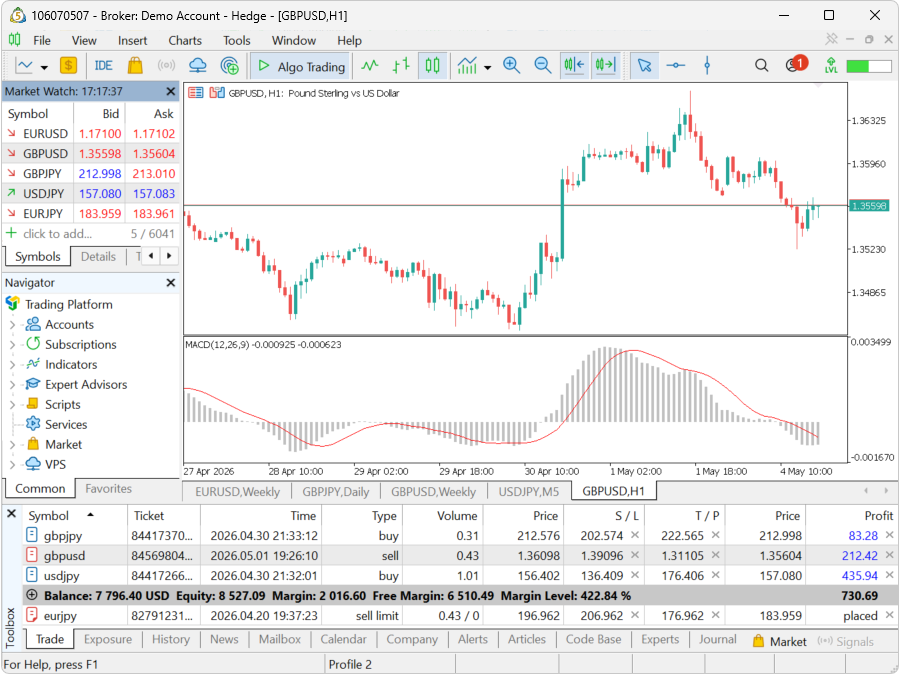
This is the primary window for managing open trades. It displays every open position and real-time floating profit and loss. Current equity is the sum of all floating positions plus the balance. The daily loss limit is measured against this equity figure. If equity reaches the breach level, the account closes.
How to open: View → Terminal → Trade tab (or press Ctrl+T)
Before every trade, check: current equity and the gap to the daily loss limit.
2. The Account Section in Navigator
This provides a quick overview of balance, equity, and margin. The daily loss limit is calculated from the closing balance at 5 PM EST, not from the equity figure shown here during the trading day.
How to open: View → Navigator (or press Ctrl+N)
3. Trade History Tab in Terminal
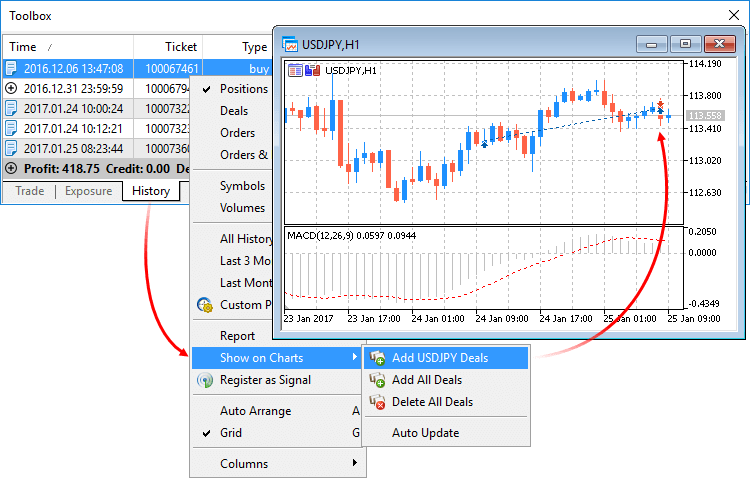
This shows all closed trades. Use it to calculate total closed profit for the current payout cycle. Traders on Two Phase Classic, Lightning, or Instant Funding Lite should also use it to monitor their Highest Daily Profit, as those three programs carry a consistency rule on the funded account.
How to open: Terminal → History tab
4. Toolbox – Exposure Tab
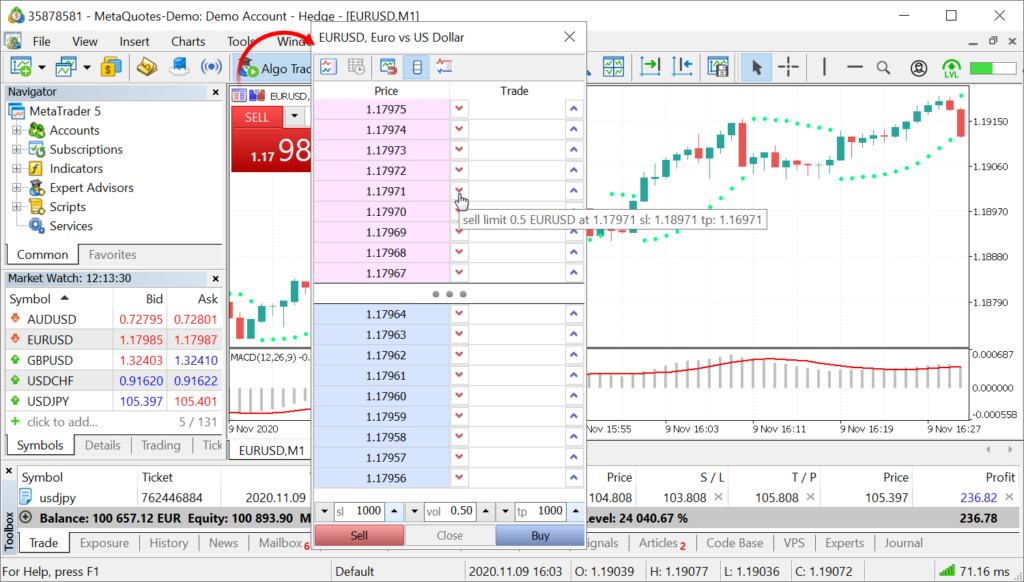
This tab shows real-time leverage exposure by instrument. Use it to verify that total market exposure stays within a range the daily loss limit can absorb.
How to open: View → Toolbox → Exposure tab (located at the bottom of the screen)
5. One-Click Trading on the Chart
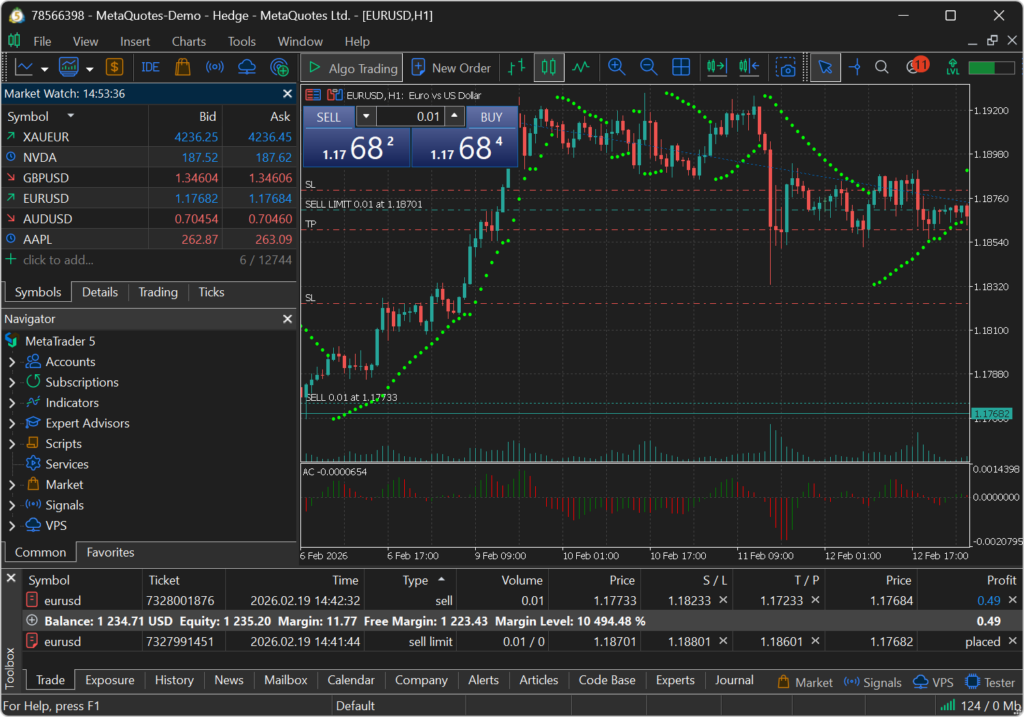
This enables rapid execution. On the Lightning Challenge, every trade must have a stop loss placed before the position opens. Placing a trade without a stop loss on Lightning is a soft breach of the evaluation rules.
How to enable: Right-click on the chart → One Click Trading
How to Calculate and Track the Daily Loss Limit in MT5
MT5 does not calculate the daily loss limit automatically. Calculate it before the first trade of each trading day.
Step 1: Find yesterday’s closing balance. Check the Account History tab for the last closed balance before 5 PM EST yesterday.
Step 2: Multiply by the daily loss limit percentage. One Phase: 3%. Two Phase Standard: 4%. Three Phase Challenge: 5%. Check the program page for the exact percentage on other programs.
Step 3: Subtract from yesterday’s closing balance. The result is today’s breach level.
Worked example: Yesterday’s closing balance was $10,400. Daily loss limit is 4% (Two Phase Standard). Loss allowance = $10,400 × 0.04 = $416. Breach level = $10,400 − $416 = $9,984. If equity reaches $9,984 at any point during the trading day, the account is in breach.
How to Size a Position in MT5 for a Funded Account
Position sizing on a funded account is calculated against the daily loss limit in dollar terms.
Step 1: Calculate dollar risk. Dollar risk = lot size × stop distance in pips × pip value.
Step 2: Set a personal daily stop. Keep this at 50% or less of the daily loss limit. On a 10,000 TwoPhasen Standard account with a 4%daily loss limit ($400), a $200 maximum daily loss keeps meaningful room between the personal stop and the breach level.
Step 3: Calculate maximum lot size. Lot size = personal daily stop ÷ (stop distance × pip value).
Use the Order window in MT5 to set the calculated lot size before confirming the trade. MT5 displays the margin required but does not calculate dollar risk. Calculate dollar risk before opening the Order window.
Pip value varies by instrument. For EURUSD, one standard lot equals $10 per pip. For other instruments, check the contract specifications in MT5 under View → Symbols before sizing any position.
For a full breakdown of account sizing by program, see How to Pick the Right Account Size for Your Prop Firm Challenge.
FAQs
Which FXIFY programs support MT5?
MT5 is available as a platform option for most FXIFY programs at checkout, alongside DXtrade and TradingView. The Lightning Challenge is exclusively MT5.
Does MT5 show the daily loss limit automatically?
No. MT5 does not display the daily loss limit. Calculate it manually from the previous day’s closing balance and the program daily loss limit percentage. Then monitor equity in the Terminal window against the calculated breach level throughout the trading day.
Do I need a stop loss on every trade in MT5 on FXIFY?
On the Lightning Challenge, a stop loss is required on every trade. Placing a trade without one is a soft breach of the evaluation rules. On all other FXIFY programs, the program rules do not require a stop loss. Using one remains good practice for position management.
How do I check my total profit for the current payout cycle in MT5?
Check the Trade History tab in the Terminal window. This shows all closed trades and their profit and loss figures. Filter by the start date of the current payout cycle to calculate the total closed profit for that period.
Can I use Expert Advisors (EAs) on FXIFY MT5 accounts?
EAs are permitted on evaluation and funded accounts for One Phase, Two Phase, and Three Phase Challenge programs. EAs are not permitted on the Lightning Challenge or either Instant Funding tier.
Bottom Line
Managing a funded account in MT5 means tracking the daily loss limit from yesterday’s closing balance, watching equity live in the Terminal window, and placing a stop loss before every entry on the Lightning Challenge.
The five windows in this guide- Terminal Trade tab, Navigator, Trade History, Exposure tab, and One-Click Trading- cover everything a funded trader needs to monitor in real time. MT5 does not automate any of this. The trader is responsible for the calculations and monitoring.
Explore FXIFY’s programs to find the rule set that matches how you trade.