Page background
40% OFF One Phase Evals for New Users
NEW40
35% OFF All Programs
FLASH35

SAVE WITH OUR EXCLUSIVE PROMOS

40% OFF One Phase Evals for New Users
Expires: 31st January 2026
NEW40
35% OFF All Programs
Expires: 4th February 2026
FLASH35
40% OFF One Phase Evals for New Users
Expires: 31st January 2026
NEW40
35% OFF All Programs
Expires: 4th February 2026
FLASH35
40% OFF One Phase Evals for New Users
Expires: 31st January 2026
NEW40
35% OFF All Programs
Expires: 4th February 2026
FLASH35
40% OFF One Phase Evals for New Users
Expires: 31st January 2026
NEW40
35% OFF All Programs
Expires: 4th February 2026
FLASH35
40% OFF One Phase Evals for New Users
Expires: 31st January 2026
NEW40
35% OFF All Programs
Expires: 4th February 2026
FLASH35
40% OFF One Phase Evals for New Users
Expires: 31st January 2026
NEW40
35% OFF All Programs
Expires: 4th February 2026
FLASH35
40% OFF One Phase Evals for New Users
Expires: 31st January 2026
NEW40
35% OFF All Programs
Expires: 4th February 2026
FLASH35
40% OFF One Phase Evals for New Users
Expires: 31st January 2026
NEW40
35% OFF All Programs
Expires: 4th February 2026
FLASH35
40% OFF One Phase Evals for New Users
Expires: 31st January 2026
NEW40
35% OFF All Programs
Expires: 4th February 2026
FLASH35
40% OFF One Phase Evals for New Users
Expires: 31st January 2026
NEW40
35% OFF All Programs
Expires: 4th February 2026
FLASH35
FAQs / All FAQs

All FAQs

Everything you need to know about our platform, evaluations and how to set up your FXIFY™ account.

Do you still need help?

Everything you need to know about our platform, evaluations and how to set up your FXIFY™ account.
FAQs
/
All FAQs
/
Exploring Pine Script on TradingView: What Is It and How to Use It?

Exploring Pine Script on TradingView: What Is It and How to Use It?


Pine Script
is TradingView’s proprietary scripting language that allows traders to create custom indicators and trading strategies. It’s designed to be beginner-friendly but powerful enough for more advanced use cases. 

You can use Pine Script to develop automated strategies, create your custom indicators, or modify existing ones to suit your needs.

To access Pine Script, open the Pine Editor at the bottom of your chart.
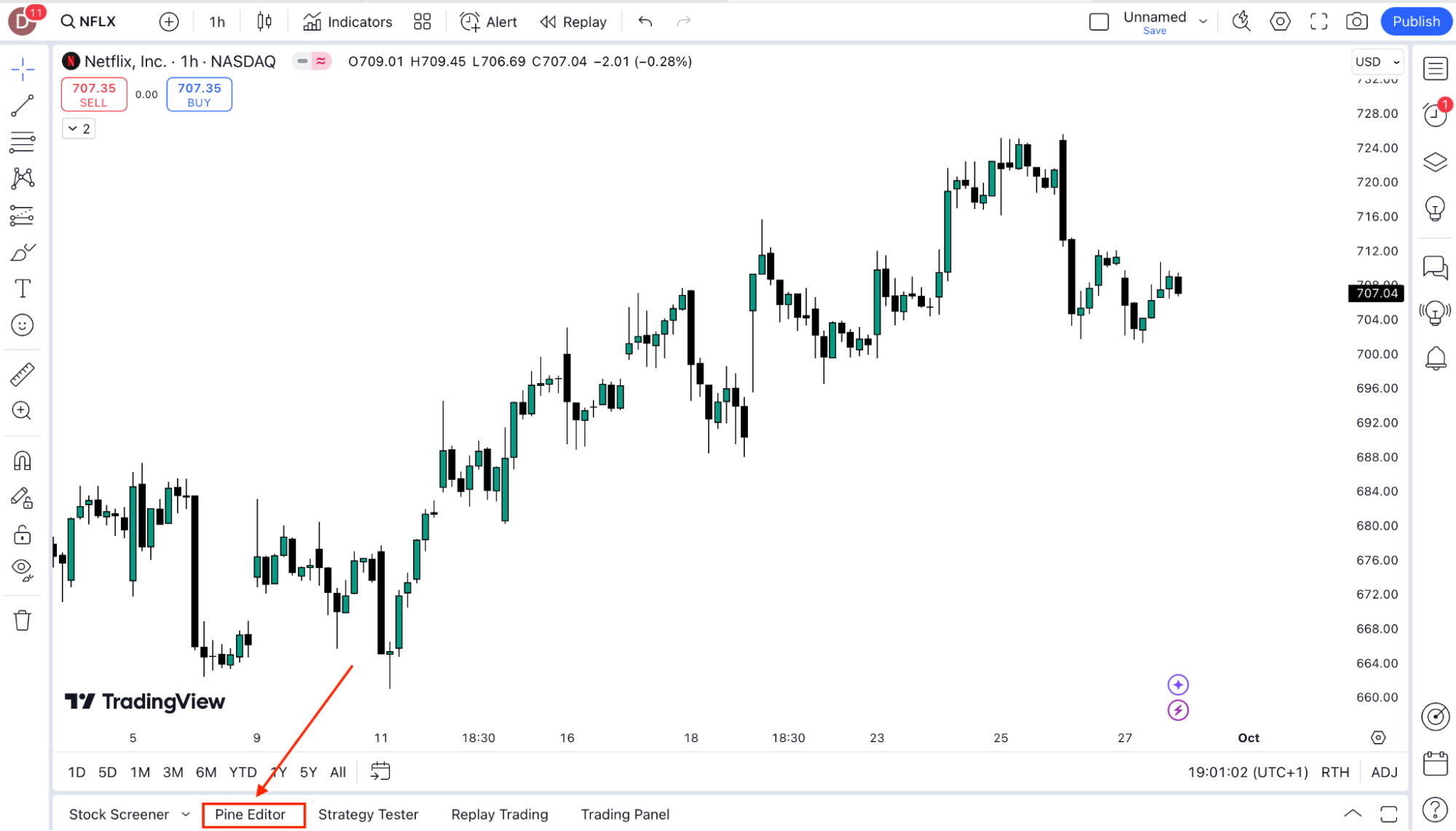
From here, you can write your code, test it on historical data, and even backtest strategies. TradingView also provides a large library of public scripts created by other users that you can study or modify. For those new to coding, TradingView’s documentation and community resources are a great starting point.

Was this FAQ helpful?
YesNo

Do you still need help?

Everything you need to know about our platform, evaluations and how to set up your FXIFY™ account.