Page background
28% OFF + FREE ADDONS (excluding Instant Funding Lite)
CNY28

SAVE WITH OUR EXCLUSIVE PROMOS

28% OFF + FREE ADDONS (excluding Instant Funding Lite)
Expires: 25th February 2026
CNY28
28% OFF + FREE ADDONS (excluding Instant Funding Lite)
Expires: 25th February 2026
CNY28
28% OFF + FREE ADDONS (excluding Instant Funding Lite)
Expires: 25th February 2026
CNY28
28% OFF + FREE ADDONS (excluding Instant Funding Lite)
Expires: 25th February 2026
CNY28
28% OFF + FREE ADDONS (excluding Instant Funding Lite)
Expires: 25th February 2026
CNY28
28% OFF + FREE ADDONS (excluding Instant Funding Lite)
Expires: 25th February 2026
CNY28
28% OFF + FREE ADDONS (excluding Instant Funding Lite)
Expires: 25th February 2026
CNY28
28% OFF + FREE ADDONS (excluding Instant Funding Lite)
Expires: 25th February 2026
CNY28
28% OFF + FREE ADDONS (excluding Instant Funding Lite)
Expires: 25th February 2026
CNY28
28% OFF + FREE ADDONS (excluding Instant Funding Lite)
Expires: 25th February 2026
CNY28
FAQs / All FAQs

All FAQs

Everything you need to know about our platform, evaluations and how to set up your FXIFYâ„¢ account.

Do you still need help?

Everything you need to know about our platform, evaluations and how to set up your FXIFYâ„¢ account.
FAQs
/
All FAQs
/
How Can I Customize the PnL Display on My TradingView Charts to Show Ticks, Pips, %, or Money?

How Can I Customize the PnL Display on My TradingView Charts to Show Ticks, Pips, %, or Money?


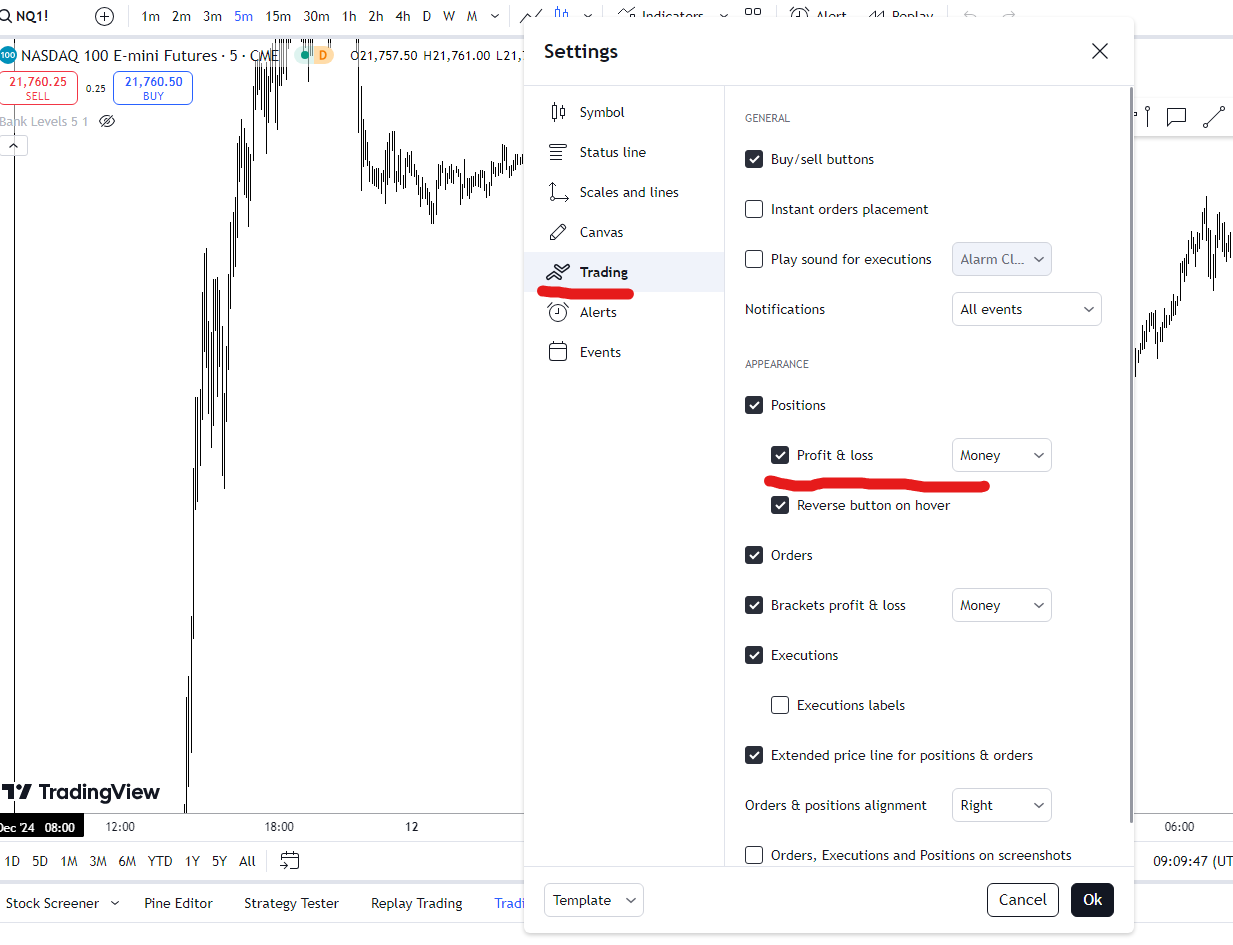
You can customize the PnL display on your TradingView charts to show ticks, pips, %, or money by adjusting the settings in the
Trading tab of the Chart settings window.

Here are the steps:

        1.   Right-click on the chart and select Settings, or click the settings wheel in the top right corner.

        2.   Click on the Trading tab within the Chart Settings window.

        3.   Under the Appearance label, find the Profit and Loss option.

        4.   Next to this option is a drop-down menu. By default, this is set to Money.

        5.   Select Ticks, Pips, or % to view the performance of a trade in the desired format.
Was this FAQ helpful?
YesNo
Do you still need help?

Everything you need to know about our platform, evaluations and how to set up your FXIFYâ„¢ account.