Page background
40% OFF One Phase Evals for New Users
NEW40
26% OFF All Programs (excl. IFL)
GOAL26

SAVE WITH OUR EXCLUSIVE PROMOS

40% OFF One Phase Evals for New Users
Expires: 31st December 2026
NEW40
26% OFF All Programs (excl. IFL)
Expires: 19th July 2026
GOAL26
40% OFF One Phase Evals for New Users
Expires: 31st December 2026
NEW40
26% OFF All Programs (excl. IFL)
Expires: 19th July 2026
GOAL26
40% OFF One Phase Evals for New Users
Expires: 31st December 2026
NEW40
26% OFF All Programs (excl. IFL)
Expires: 19th July 2026
GOAL26
40% OFF One Phase Evals for New Users
Expires: 31st December 2026
NEW40
26% OFF All Programs (excl. IFL)
Expires: 19th July 2026
GOAL26
40% OFF One Phase Evals for New Users
Expires: 31st December 2026
NEW40
26% OFF All Programs (excl. IFL)
Expires: 19th July 2026
GOAL26
40% OFF One Phase Evals for New Users
Expires: 31st December 2026
NEW40
26% OFF All Programs (excl. IFL)
Expires: 19th July 2026
GOAL26
40% OFF One Phase Evals for New Users
Expires: 31st December 2026
NEW40
26% OFF All Programs (excl. IFL)
Expires: 19th July 2026
GOAL26
40% OFF One Phase Evals for New Users
Expires: 31st December 2026
NEW40
26% OFF All Programs (excl. IFL)
Expires: 19th July 2026
GOAL26
40% OFF One Phase Evals for New Users
Expires: 31st December 2026
NEW40
26% OFF All Programs (excl. IFL)
Expires: 19th July 2026
GOAL26
40% OFF One Phase Evals for New Users
Expires: 31st December 2026
NEW40
26% OFF All Programs (excl. IFL)
Expires: 19th July 2026
GOAL26
FAQs / All FAQs

All FAQs

Everything you need to know about our platform, evaluations and how to set up your FXIFY™ account.

Do you still need help?

Everything you need to know about our platform, evaluations and how to set up your FXIFY™ account.
FAQs
/
All FAQs
/
How Do I Backtest on TradingView?

How Do I Backtest on TradingView?

Backtesting on TradingView allows you to evaluate the performance of a trading strategy using historical data. Here’s how to do it:

        1.  Open a Chart: Select the asset and timeframe you want to backtest.

        2.  Add a Strategy:
                               a.  Click the “Indicators” button at the top.
                              b.  
In the Indicators window, select “Strategies” from the list.
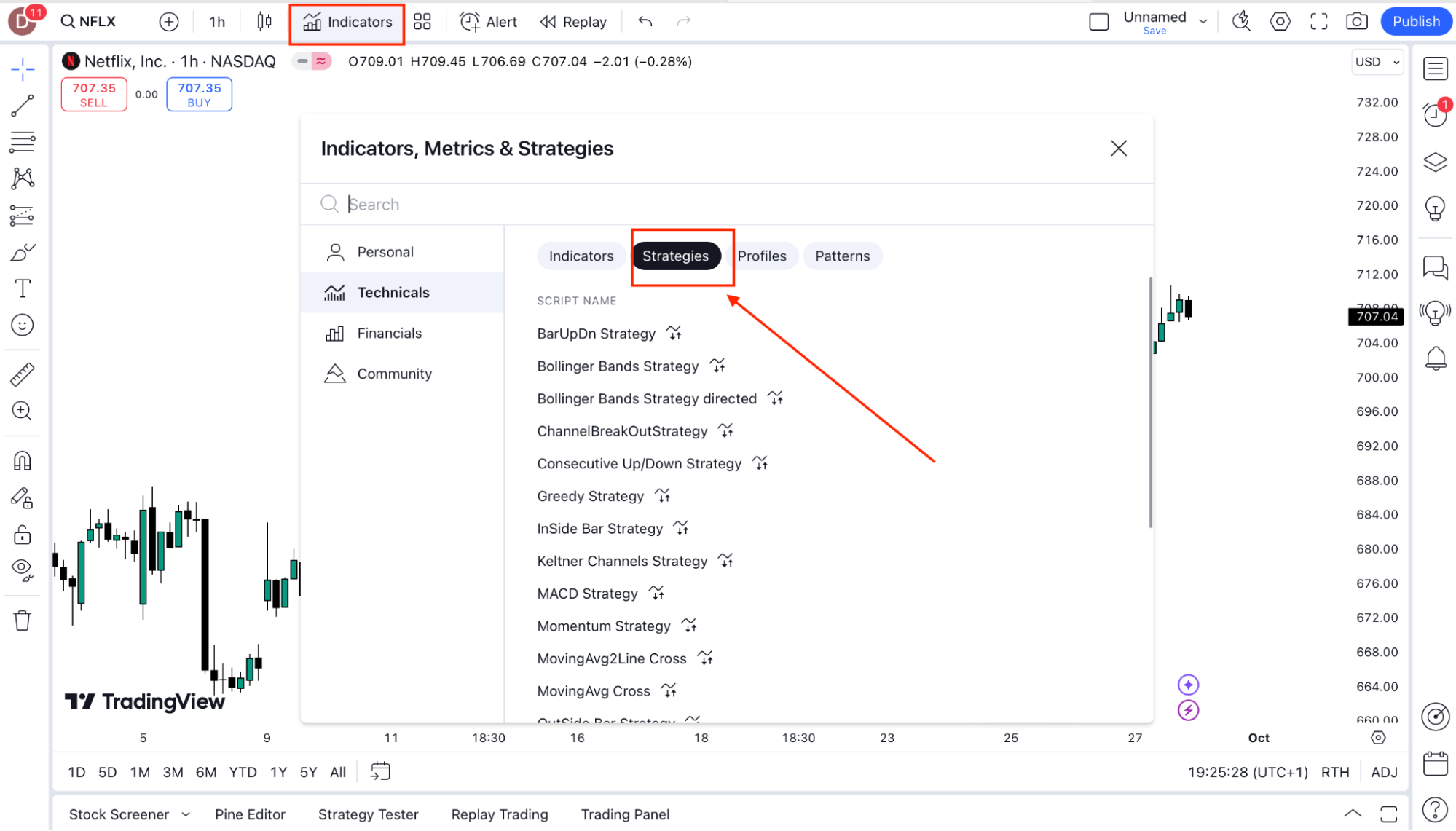
                              c. Choose from pre-built strategies (e.g., Moving Average Crossover) or create your own in the Pine Script Editor.

        3.  View Strategy Performance:
                               a.  
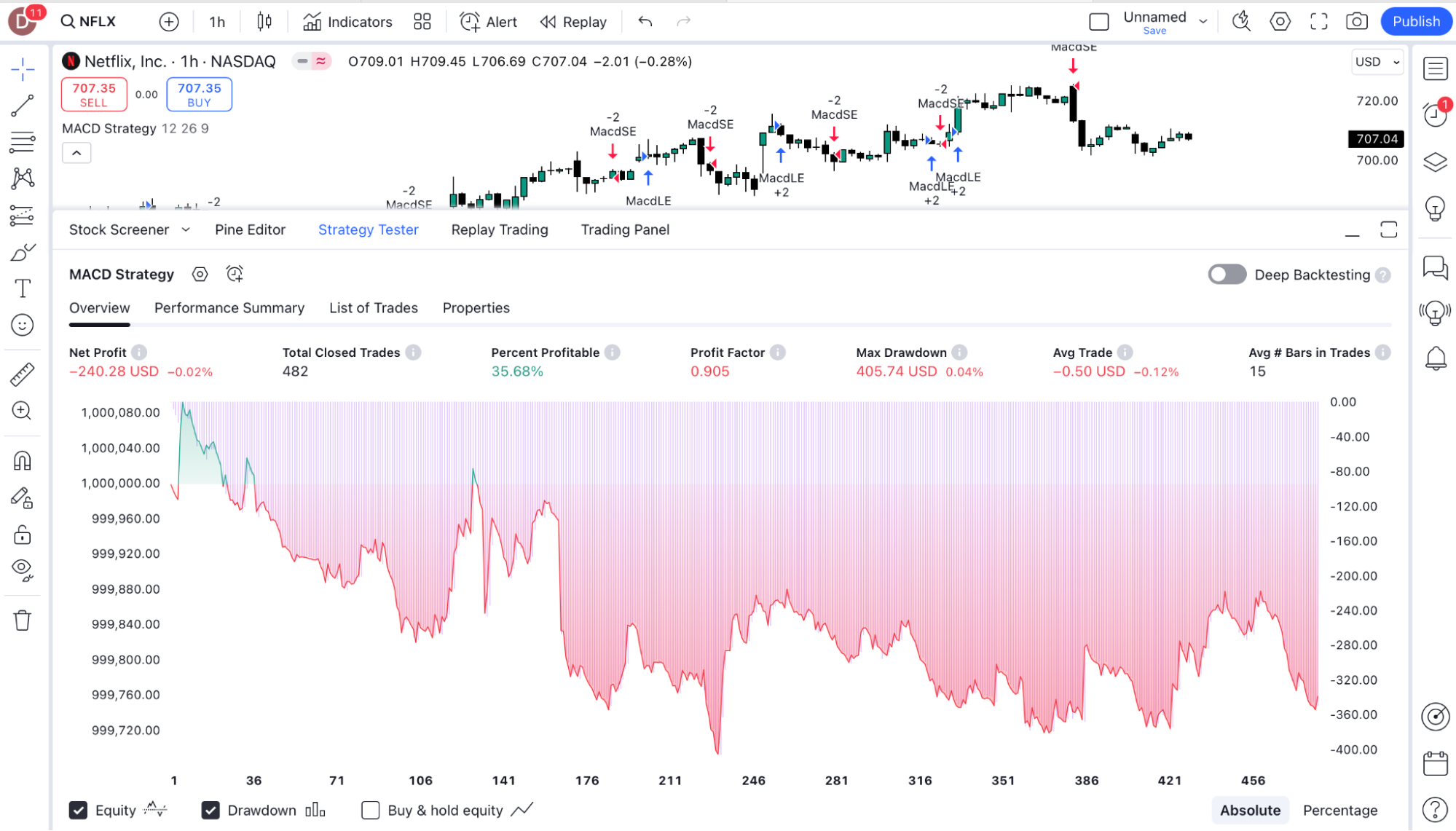
Once a strategy is applied, you’ll see buy/sell markers on the chart.
                               b.  At the bottom, open the Strategy Tester panel, which shows key metrics like Net Profit, Win Rate, Max Drawdown, and more.

        4.  Customise Parameters:
                               a.  
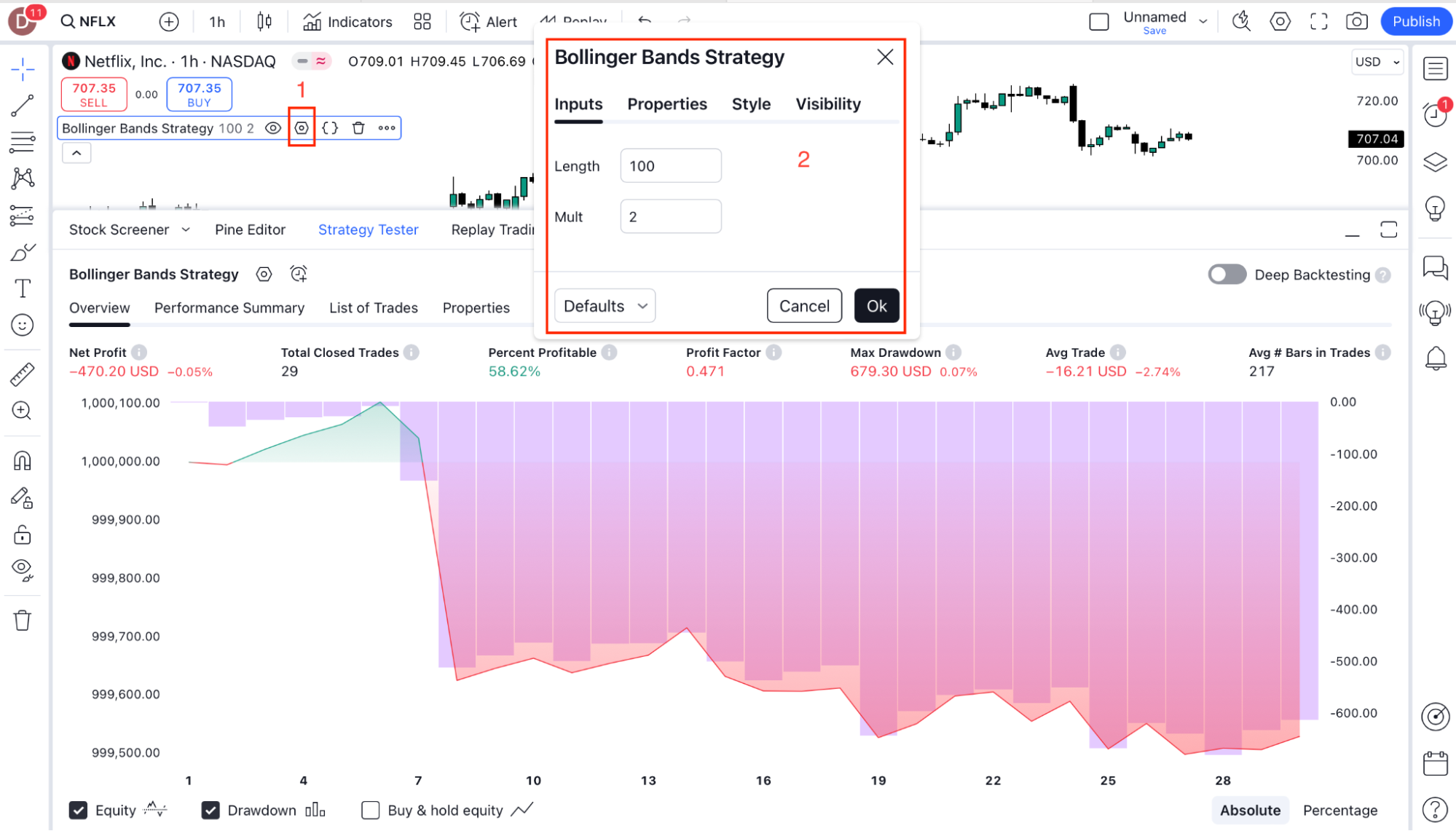
You can adjust the strategy’s parameters in the settings (gear icon next to the strategy name). This allows you to test different values to optimize the strategy’s performance.

        5.  Backtest on Different Timeframes:
                               a.  
You can change the chart’s timeframe to test your strategy on different periods to see how it performs under varying market conditions.
Was this FAQ helpful?
YesNo

Do you still need help?

Everything you need to know about our platform, evaluations and how to set up your FXIFY™ account.

DO NOT WAIT FOR THE

perfect moment

Take on the markets with up to $400K.
FXIFY Anniversary