Page background
NEW CUSTOMERS: 30% OFF 2 PHASE PRO
NEW30
WORLD CUP SALE: 26% OFF (excl. Instant Lite)
GOAL26

SAVE WITH OUR EXCLUSIVE PROMOS

NEW CUSTOMERS: 30% OFF 2 PHASE PRO
Expires: 31st December 2026
NEW30
WORLD CUP SALE: 26% OFF (excl. Instant Lite)
Expires: 21st July 2026
GOAL26
NEW CUSTOMERS: 30% OFF 2 PHASE PRO
Expires: 31st December 2026
NEW30
WORLD CUP SALE: 26% OFF (excl. Instant Lite)
Expires: 21st July 2026
GOAL26
NEW CUSTOMERS: 30% OFF 2 PHASE PRO
Expires: 31st December 2026
NEW30
WORLD CUP SALE: 26% OFF (excl. Instant Lite)
Expires: 21st July 2026
GOAL26
NEW CUSTOMERS: 30% OFF 2 PHASE PRO
Expires: 31st December 2026
NEW30
WORLD CUP SALE: 26% OFF (excl. Instant Lite)
Expires: 21st July 2026
GOAL26
NEW CUSTOMERS: 30% OFF 2 PHASE PRO
Expires: 31st December 2026
NEW30
WORLD CUP SALE: 26% OFF (excl. Instant Lite)
Expires: 21st July 2026
GOAL26
NEW CUSTOMERS: 30% OFF 2 PHASE PRO
Expires: 31st December 2026
NEW30
WORLD CUP SALE: 26% OFF (excl. Instant Lite)
Expires: 21st July 2026
GOAL26
NEW CUSTOMERS: 30% OFF 2 PHASE PRO
Expires: 31st December 2026
NEW30
WORLD CUP SALE: 26% OFF (excl. Instant Lite)
Expires: 21st July 2026
GOAL26
NEW CUSTOMERS: 30% OFF 2 PHASE PRO
Expires: 31st December 2026
NEW30
WORLD CUP SALE: 26% OFF (excl. Instant Lite)
Expires: 21st July 2026
GOAL26
NEW CUSTOMERS: 30% OFF 2 PHASE PRO
Expires: 31st December 2026
NEW30
WORLD CUP SALE: 26% OFF (excl. Instant Lite)
Expires: 21st July 2026
GOAL26
NEW CUSTOMERS: 30% OFF 2 PHASE PRO
Expires: 31st December 2026
NEW30
WORLD CUP SALE: 26% OFF (excl. Instant Lite)
Expires: 21st July 2026
GOAL26
FAQs / All FAQs

All FAQs

Everything you need to know about our platform, evaluations and how to set up your FXIFY™ account.

Do you still need help?

Everything you need to know about our platform, evaluations and how to set up your FXIFY™ account.
FAQs
/
All FAQs
/
How Do I Change Timezones on TradingView?

How Do I Change Timezones on TradingView?

To change the timezone on your chart:

        1.   Click on the clock icon/time at the bottom-right corner of your chart.
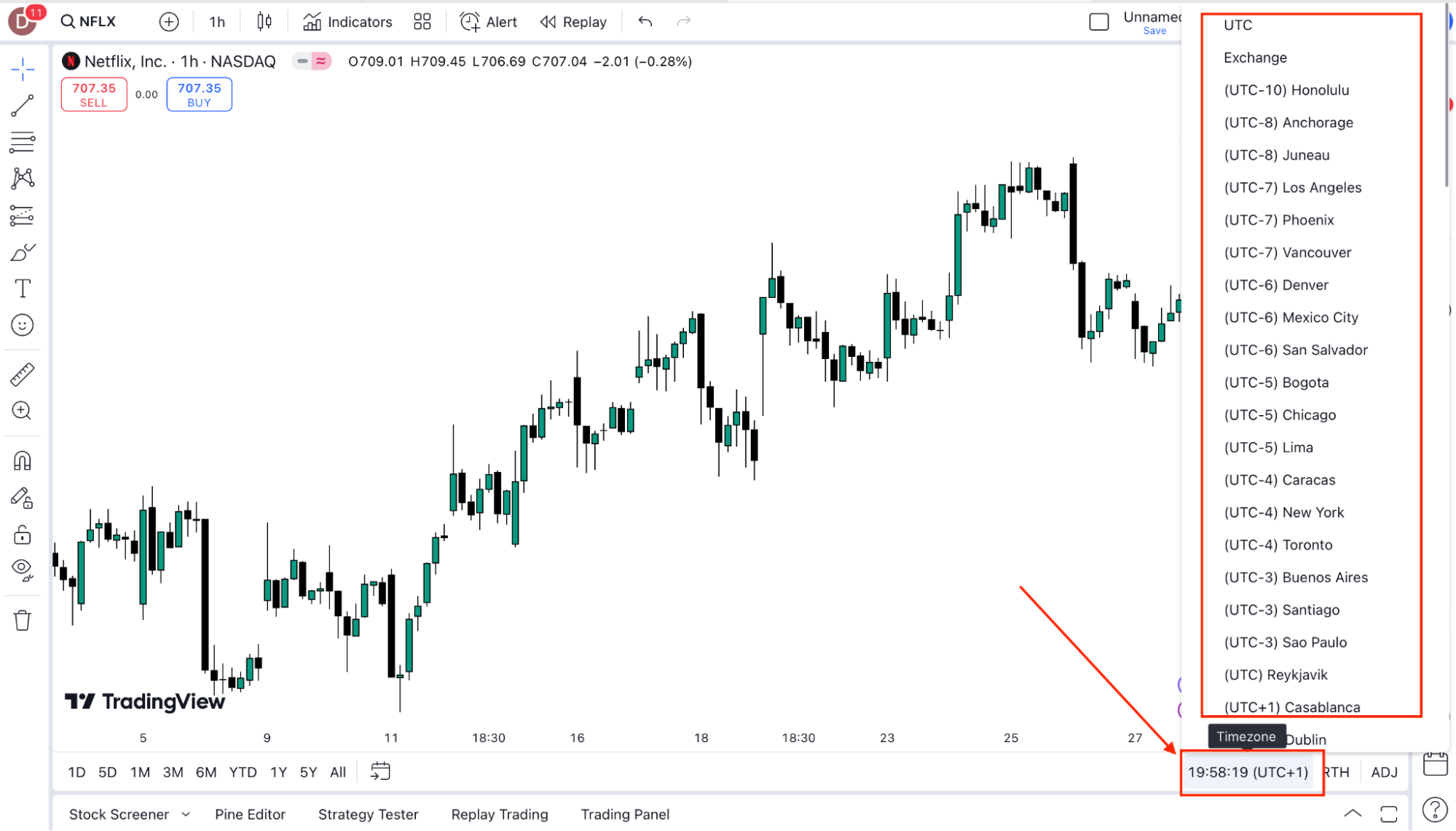
        2.   From the dropdown, select your Timezone. This will be displayed in UTC.

        3.   Choose your preferred timezone from the list.

        4.   Your chart will automatically adjust to reflect the selected timezone.


Was this FAQ helpful?
YesNo
Do you still need help?

Everything you need to know about our platform, evaluations and how to set up your FXIFY™ account.
Take the shot before the whistle blows — trade the markets with up to $400K capital. 26% off all programs. Use code GOAL26.

JOIN US NOW!

GET EARLY ACCESS TO UPCOMING OFFERS

ENDS 21 JUL MIDNIGHT EST *Offer Excludes Instant Funding Lite