Page background
FLASH SALE: 40% OFF ALL 50K ACCOUNTS (excl. Instant Lite)
FIFTY40
NEW TRADERS: 35% OFF 1-PHASE
ONESTEP35

SAVE WITH OUR EXCLUSIVE PROMOS

FLASH SALE: 40% OFF ALL 50K ACCOUNTS (excl. Instant Lite)
Expires: 2nd October 2026
FIFTY40
NEW TRADERS: 35% OFF 1-PHASE
Expires: 31st December 2026
ONESTEP35
FLASH SALE: 40% OFF ALL 50K ACCOUNTS (excl. Instant Lite)
Expires: 2nd October 2026
FIFTY40
NEW TRADERS: 35% OFF 1-PHASE
Expires: 31st December 2026
ONESTEP35
FLASH SALE: 40% OFF ALL 50K ACCOUNTS (excl. Instant Lite)
Expires: 2nd October 2026
FIFTY40
NEW TRADERS: 35% OFF 1-PHASE
Expires: 31st December 2026
ONESTEP35
FLASH SALE: 40% OFF ALL 50K ACCOUNTS (excl. Instant Lite)
Expires: 2nd October 2026
FIFTY40
NEW TRADERS: 35% OFF 1-PHASE
Expires: 31st December 2026
ONESTEP35
FLASH SALE: 40% OFF ALL 50K ACCOUNTS (excl. Instant Lite)
Expires: 2nd October 2026
FIFTY40
NEW TRADERS: 35% OFF 1-PHASE
Expires: 31st December 2026
ONESTEP35
FLASH SALE: 40% OFF ALL 50K ACCOUNTS (excl. Instant Lite)
Expires: 2nd October 2026
FIFTY40
NEW TRADERS: 35% OFF 1-PHASE
Expires: 31st December 2026
ONESTEP35
FLASH SALE: 40% OFF ALL 50K ACCOUNTS (excl. Instant Lite)
Expires: 2nd October 2026
FIFTY40
NEW TRADERS: 35% OFF 1-PHASE
Expires: 31st December 2026
ONESTEP35
FLASH SALE: 40% OFF ALL 50K ACCOUNTS (excl. Instant Lite)
Expires: 2nd October 2026
FIFTY40
NEW TRADERS: 35% OFF 1-PHASE
Expires: 31st December 2026
ONESTEP35
FLASH SALE: 40% OFF ALL 50K ACCOUNTS (excl. Instant Lite)
Expires: 2nd October 2026
FIFTY40
NEW TRADERS: 35% OFF 1-PHASE
Expires: 31st December 2026
ONESTEP35
FLASH SALE: 40% OFF ALL 50K ACCOUNTS (excl. Instant Lite)
Expires: 2nd October 2026
FIFTY40
NEW TRADERS: 35% OFF 1-PHASE
Expires: 31st December 2026
ONESTEP35
FAQs / All FAQs

All FAQs

Everything you need to know about our platform, evaluations and how to set up your FXIFYâ„¢ account.

Do you still need help?

Everything you need to know about our platform, evaluations and how to set up your FXIFYâ„¢ account.
FAQs
/
All FAQs
/
How to add a new price chart to DXtrade?

How to add a new price chart to DXtrade?

The price chart displays on DXtrade are versatile and customisable. You can drag and drop a chart anywhere in DXtrade, or slot it in as a tab into any widget.

Opening New Price Chart Tabs:
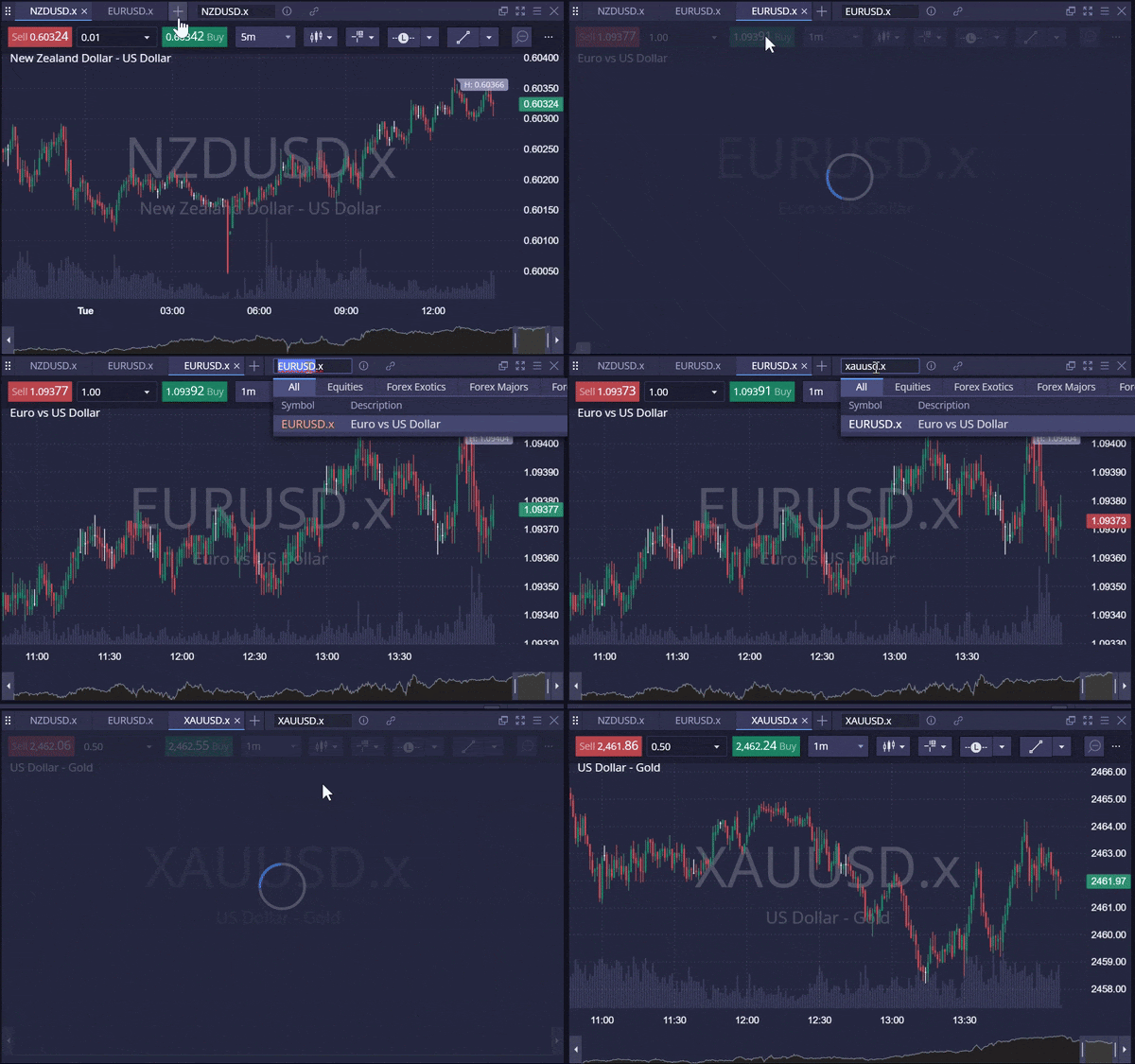
To add a price chart as a tab into a chart widget, you can simply use the [+] button from any window:

  1. Click on the [+] icon located in the chart widget.
  2. Select [Chart].
  3. Type the asset you want to view into the search bar.

Viewing Multiple Charts at Once:

To view multiple charts side by side, you need to open a new chart widget.

  1. Tap on [Chart], located at the top of DXtrade.
  2. This will open a new chart widget on the right-hand side of the screen.
  3. Use the search bar to find the asset you wish to view.


Was this FAQ helpful?
YesNo

Do you still need help?

Everything you need to know about our platform, evaluations and how to set up your FXIFYâ„¢ account.
September Flash Sale — 40% off all $50K programs. Use code FIFTY40. Ends 2 Oct midnight EST.

JOIN US NOW!

GET EARLY ACCESS TO UPCOMING OFFERS

*By submitting this form, you agree to receive marketing emails from FXIFY.
FXIFY Pulse | Market Insights — live on YouTube every Tuesday & Thursday, 10AM EST / GMT-4 Hosted by Jeremy Wagner, CEWA-M — Head of Research at Alchemy Markets, former Head of Technical Analysis at DailyFX NOTIFY ME