Page background
40% OFF One Phase Evals for New Users
NEW40
Father's Day Sale - 35% OFF
PAPA35

SAVE WITH OUR EXCLUSIVE PROMOS

40% OFF One Phase Evals for New Users
Expires: 31st December 2026
NEW40
Father's Day Sale - 35% OFF
Expires: 22nd June 2026
PAPA35
40% OFF One Phase Evals for New Users
Expires: 31st December 2026
NEW40
Father's Day Sale - 35% OFF
Expires: 22nd June 2026
PAPA35
40% OFF One Phase Evals for New Users
Expires: 31st December 2026
NEW40
Father's Day Sale - 35% OFF
Expires: 22nd June 2026
PAPA35
40% OFF One Phase Evals for New Users
Expires: 31st December 2026
NEW40
Father's Day Sale - 35% OFF
Expires: 22nd June 2026
PAPA35
40% OFF One Phase Evals for New Users
Expires: 31st December 2026
NEW40
Father's Day Sale - 35% OFF
Expires: 22nd June 2026
PAPA35
40% OFF One Phase Evals for New Users
Expires: 31st December 2026
NEW40
Father's Day Sale - 35% OFF
Expires: 22nd June 2026
PAPA35
40% OFF One Phase Evals for New Users
Expires: 31st December 2026
NEW40
Father's Day Sale - 35% OFF
Expires: 22nd June 2026
PAPA35
40% OFF One Phase Evals for New Users
Expires: 31st December 2026
NEW40
Father's Day Sale - 35% OFF
Expires: 22nd June 2026
PAPA35
40% OFF One Phase Evals for New Users
Expires: 31st December 2026
NEW40
Father's Day Sale - 35% OFF
Expires: 22nd June 2026
PAPA35
40% OFF One Phase Evals for New Users
Expires: 31st December 2026
NEW40
Father's Day Sale - 35% OFF
Expires: 22nd June 2026
PAPA35
FAQs / All FAQs

All FAQs

Everything you need to know about our platform, evaluations and how to set up your FXIFY™ account.

Do you still need help?

Everything you need to know about our platform, evaluations and how to set up your FXIFY™ account.
FAQs
/
All FAQs
/
How to add or remove indicators in DXtrade?
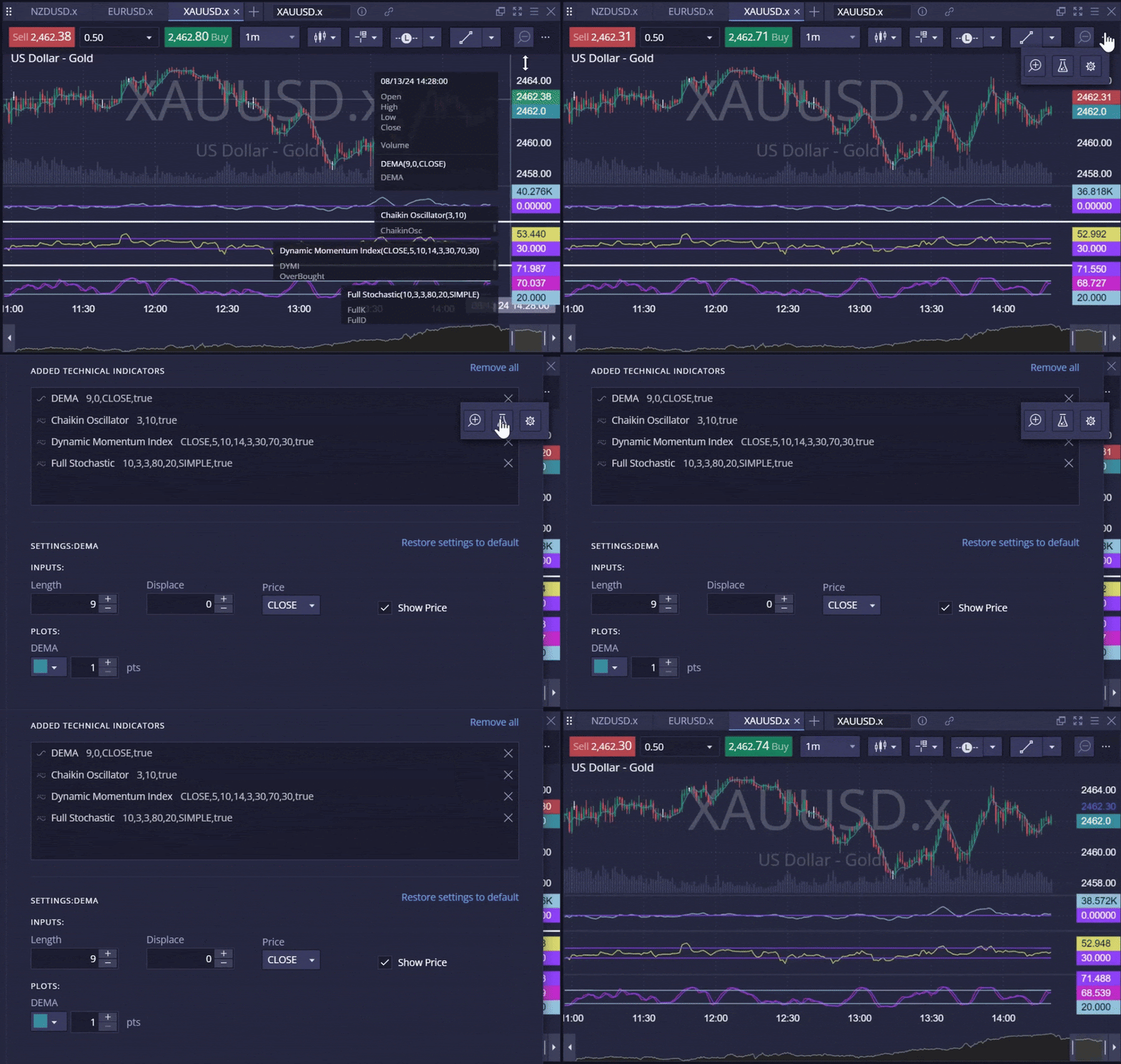
How to add or remove indicators in DXtrade?

 You can add an indicator to a price chart from the toolbar, which is located at the top of the chart. This will open a menu containing 90 available technical indicators you can add and remove from the chart at any time.

How to add an indicator in DXtrade:
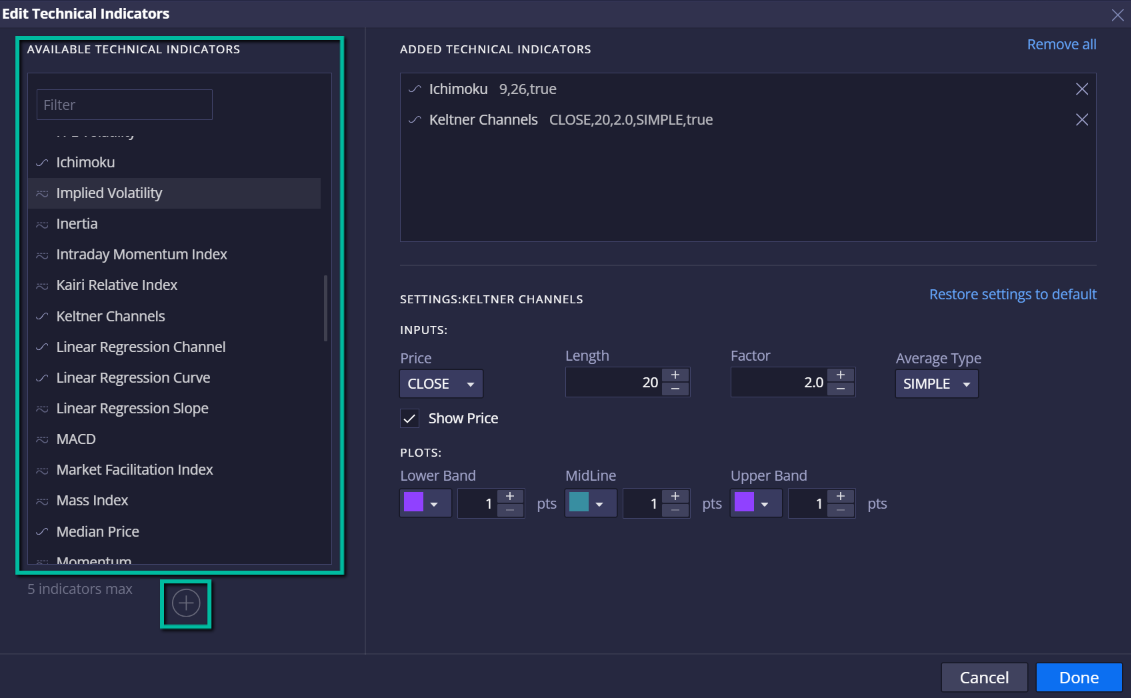
  1. Click on the icon which looks like a beaker to open your [Technical Indicators] window.
  2. Select up to 5 indicators you want to add to the chart.
  3. Press on the [+] icon to add to your chart.
  4. Hit [Done] to apply changes. Hit [Cancel] to discard changes.

How to remove an indicator in DXtrade:
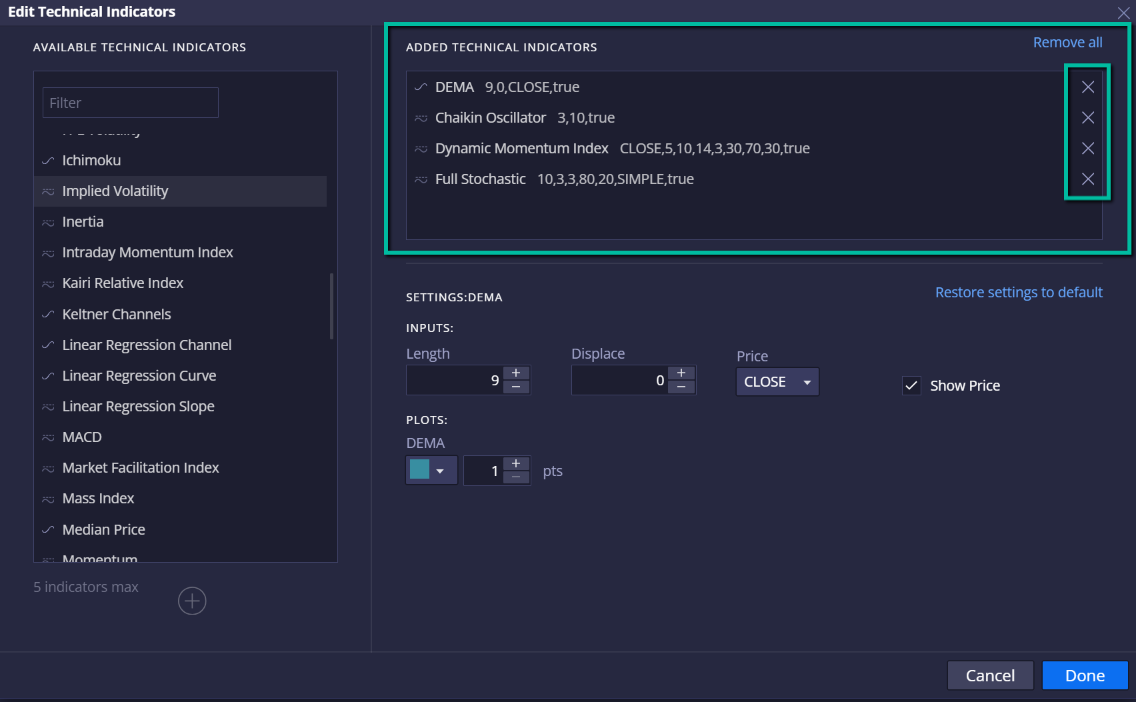
  1. Open the [Technical Indicators] window.
  2. From the Added Technical Indicators section, press the [X] icon to remove an indicator.
  3. Hit [Done] to apply changes. Hit [Cancel] to discard changes.
Was this FAQ helpful?
YesNo

Do you still need help?

Everything you need to know about our platform, evaluations and how to set up your FXIFY™ account.
What Daddy really wants
35% off all programs 3 days only
Use code PAPA35

ENDS: 22 JUNE MIDNIGHT EST *Instant Funding Lite Excluded.