



Page background
25% OFF All Programs + 2 Free Addons
BM25
40% OFF One Phase Evals for New Users
NEW40

SAVE WITH OUR EXCLUSIVE PROMOS

25% OFF All Programs + 2 Free Addons
Expires: 23rd January 2026
BM25
40% OFF One Phase Evals for New Users
Expires: 23rd January 2026
NEW40
25% OFF All Programs + 2 Free Addons
Expires: 23rd January 2026
BM25
40% OFF One Phase Evals for New Users
Expires: 23rd January 2026
NEW40
25% OFF All Programs + 2 Free Addons
Expires: 23rd January 2026
BM25
40% OFF One Phase Evals for New Users
Expires: 23rd January 2026
NEW40
25% OFF All Programs + 2 Free Addons
Expires: 23rd January 2026
BM25
40% OFF One Phase Evals for New Users
Expires: 23rd January 2026
NEW40
25% OFF All Programs + 2 Free Addons
Expires: 23rd January 2026
BM25
40% OFF One Phase Evals for New Users
Expires: 23rd January 2026
NEW40
25% OFF All Programs + 2 Free Addons
Expires: 23rd January 2026
BM25
40% OFF One Phase Evals for New Users
Expires: 23rd January 2026
NEW40
25% OFF All Programs + 2 Free Addons
Expires: 23rd January 2026
BM25
40% OFF One Phase Evals for New Users
Expires: 23rd January 2026
NEW40
25% OFF All Programs + 2 Free Addons
Expires: 23rd January 2026
BM25
40% OFF One Phase Evals for New Users
Expires: 23rd January 2026
NEW40
25% OFF All Programs + 2 Free Addons
Expires: 23rd January 2026
BM25
40% OFF One Phase Evals for New Users
Expires: 23rd January 2026
NEW40
25% OFF All Programs + 2 Free Addons
Expires: 23rd January 2026
BM25
40% OFF One Phase Evals for New Users
Expires: 23rd January 2026
NEW40
FAQs / All FAQs

All FAQs

Everything you need to know about our platform, evaluations and how to set up your FXIFY™ account.

Do you still need help?

Everything you need to know about our platform, evaluations and how to set up your FXIFY™ account.
FAQs
/
All FAQs
/
How to Add Stop Loss and Take Profit to Existing Trade:

How to Add Stop Loss and Take Profit to Existing Trade:

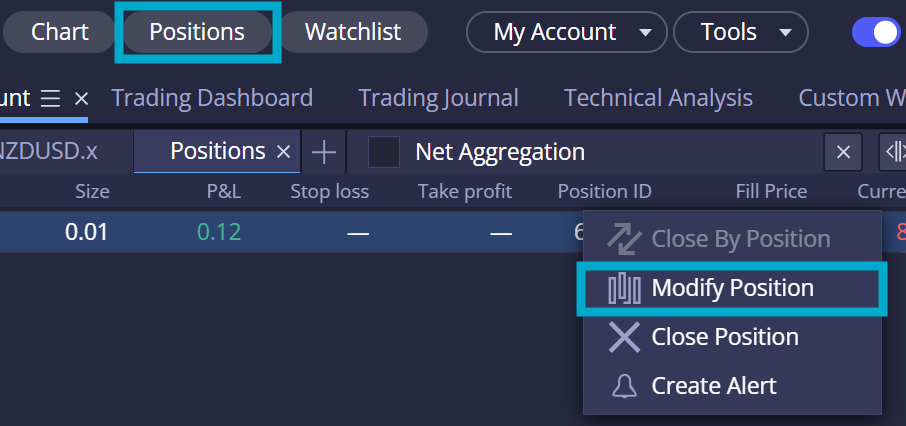
To modify your existing trades’ stop loss and take profit, open up the [Positions] widget from the top of the page. Then, from the [Positions] widget, right-click on the trade you want to modify and select [Modify Position].
 

Was this FAQ helpful?
YesNo

Do you still need help?

Everything you need to know about our platform, evaluations and how to set up your FXIFY™ account.