Page background
NEW CUSTOMERS: 30% OFF 2 PHASE PRO
NEW30
WORLD CUP SALE: 26% OFF (excl. Instant Lite)
GOAL26

SAVE WITH OUR EXCLUSIVE PROMOS

NEW CUSTOMERS: 30% OFF 2 PHASE PRO
Expires: 31st December 2026
NEW30
WORLD CUP SALE: 26% OFF (excl. Instant Lite)
Expires: 21st July 2026
GOAL26
NEW CUSTOMERS: 30% OFF 2 PHASE PRO
Expires: 31st December 2026
NEW30
WORLD CUP SALE: 26% OFF (excl. Instant Lite)
Expires: 21st July 2026
GOAL26
NEW CUSTOMERS: 30% OFF 2 PHASE PRO
Expires: 31st December 2026
NEW30
WORLD CUP SALE: 26% OFF (excl. Instant Lite)
Expires: 21st July 2026
GOAL26
NEW CUSTOMERS: 30% OFF 2 PHASE PRO
Expires: 31st December 2026
NEW30
WORLD CUP SALE: 26% OFF (excl. Instant Lite)
Expires: 21st July 2026
GOAL26
NEW CUSTOMERS: 30% OFF 2 PHASE PRO
Expires: 31st December 2026
NEW30
WORLD CUP SALE: 26% OFF (excl. Instant Lite)
Expires: 21st July 2026
GOAL26
NEW CUSTOMERS: 30% OFF 2 PHASE PRO
Expires: 31st December 2026
NEW30
WORLD CUP SALE: 26% OFF (excl. Instant Lite)
Expires: 21st July 2026
GOAL26
NEW CUSTOMERS: 30% OFF 2 PHASE PRO
Expires: 31st December 2026
NEW30
WORLD CUP SALE: 26% OFF (excl. Instant Lite)
Expires: 21st July 2026
GOAL26
NEW CUSTOMERS: 30% OFF 2 PHASE PRO
Expires: 31st December 2026
NEW30
WORLD CUP SALE: 26% OFF (excl. Instant Lite)
Expires: 21st July 2026
GOAL26
NEW CUSTOMERS: 30% OFF 2 PHASE PRO
Expires: 31st December 2026
NEW30
WORLD CUP SALE: 26% OFF (excl. Instant Lite)
Expires: 21st July 2026
GOAL26
NEW CUSTOMERS: 30% OFF 2 PHASE PRO
Expires: 31st December 2026
NEW30
WORLD CUP SALE: 26% OFF (excl. Instant Lite)
Expires: 21st July 2026
GOAL26
FAQs / All FAQs

All FAQs

Everything you need to know about our platform, evaluations and how to set up your FXIFY™ account.

Do you still need help?

Everything you need to know about our platform, evaluations and how to set up your FXIFY™ account.
FAQs
/
All FAQs
/
How to Add Stop Loss and Take Profit to Existing Trade:

How to Add Stop Loss and Take Profit to Existing Trade:

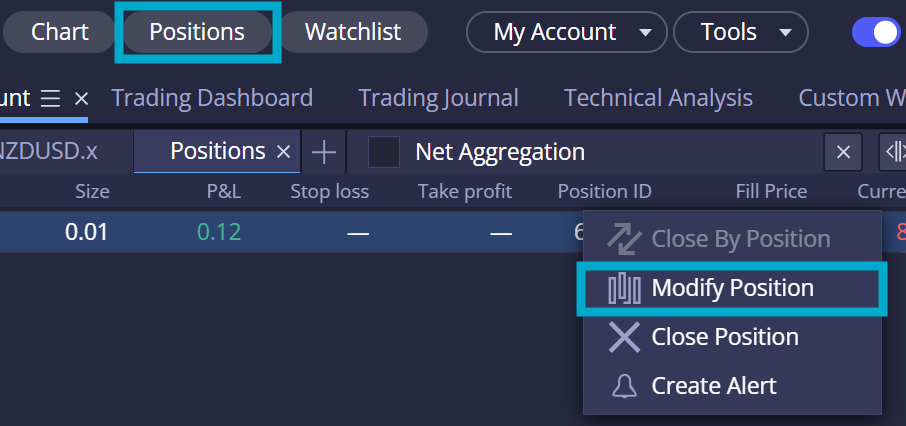
To modify your existing trades’ stop loss and take profit, open up the [Positions] widget from the top of the page. Then, from the [Positions] widget, right-click on the trade you want to modify and select [Modify Position].
 

Was this FAQ helpful?
YesNo
Do you still need help?

Everything you need to know about our platform, evaluations and how to set up your FXIFY™ account.
Summer Flash Sale — 30% off all programs + 1 free add-on. Use code FLASH30. 4 days only.

JOIN US NOW!

GET EARLY ACCESS TO UPCOMING OFFERS

LIMITED-TIME OFFER *Offer Excludes Instant Funding Lite