Page background
20% OFF All Programs
DOITRIGHT

SAVE WITH OUR EXCLUSIVE PROMOS

20% OFF All Programs
Expires: 19th January 2026
DOITRIGHT
20% OFF All Programs
Expires: 19th January 2026
DOITRIGHT
20% OFF All Programs
Expires: 19th January 2026
DOITRIGHT
20% OFF All Programs
Expires: 19th January 2026
DOITRIGHT
20% OFF All Programs
Expires: 19th January 2026
DOITRIGHT
20% OFF All Programs
Expires: 19th January 2026
DOITRIGHT
20% OFF All Programs
Expires: 19th January 2026
DOITRIGHT
20% OFF All Programs
Expires: 19th January 2026
DOITRIGHT
20% OFF All Programs
Expires: 19th January 2026
DOITRIGHT
20% OFF All Programs
Expires: 19th January 2026
DOITRIGHT
FAQs / All FAQs

All FAQs

Everything you need to know about our platform, evaluations and how to set up your FXIFY™ account.

Do you still need help?

Everything you need to know about our platform, evaluations and how to set up your FXIFY™ account.
FAQs
/
All FAQs
/
How to change the language on DXtrade?
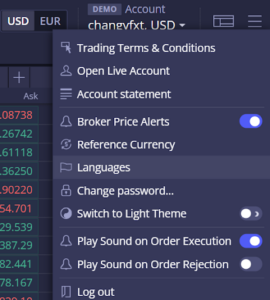
How to change the language on DXtrade?

Follow these steps to change the interface’s language on DXtrade:

  1. At the top right corner of your DXtrade window, click on the [] icon.

      2. Next, select “Languages” to pick your preferred display language.


Was this FAQ helpful?
YesNo
Do you still need help?

Everything you need to know about our platform, evaluations and how to set up your FXIFY™ account.