



Page background
25% OFF All Programs (base price) + 2 FREE Addons
GIFT25

SAVE WITH OUR EXCLUSIVE PROMOS

25% OFF All Programs (base price) + 2 FREE Addons
Expires: 30th December 2025
GIFT25
25% OFF All Programs (base price) + 2 FREE Addons
Expires: 30th December 2025
GIFT25
25% OFF All Programs (base price) + 2 FREE Addons
Expires: 30th December 2025
GIFT25
25% OFF All Programs (base price) + 2 FREE Addons
Expires: 30th December 2025
GIFT25
25% OFF All Programs (base price) + 2 FREE Addons
Expires: 30th December 2025
GIFT25
25% OFF All Programs (base price) + 2 FREE Addons
Expires: 30th December 2025
GIFT25
25% OFF All Programs (base price) + 2 FREE Addons
Expires: 30th December 2025
GIFT25
25% OFF All Programs (base price) + 2 FREE Addons
Expires: 30th December 2025
GIFT25
25% OFF All Programs (base price) + 2 FREE Addons
Expires: 30th December 2025
GIFT25
25% OFF All Programs (base price) + 2 FREE Addons
Expires: 30th December 2025
GIFT25
FAQs / All FAQs

All FAQs

Everything you need to know about our platform, evaluations and how to set up your FXIFY™ account.

Do you still need help?

Everything you need to know about our platform, evaluations and how to set up your FXIFY™ account.
FAQs
/
All FAQs
/
How to check instrument info in DXtrade?
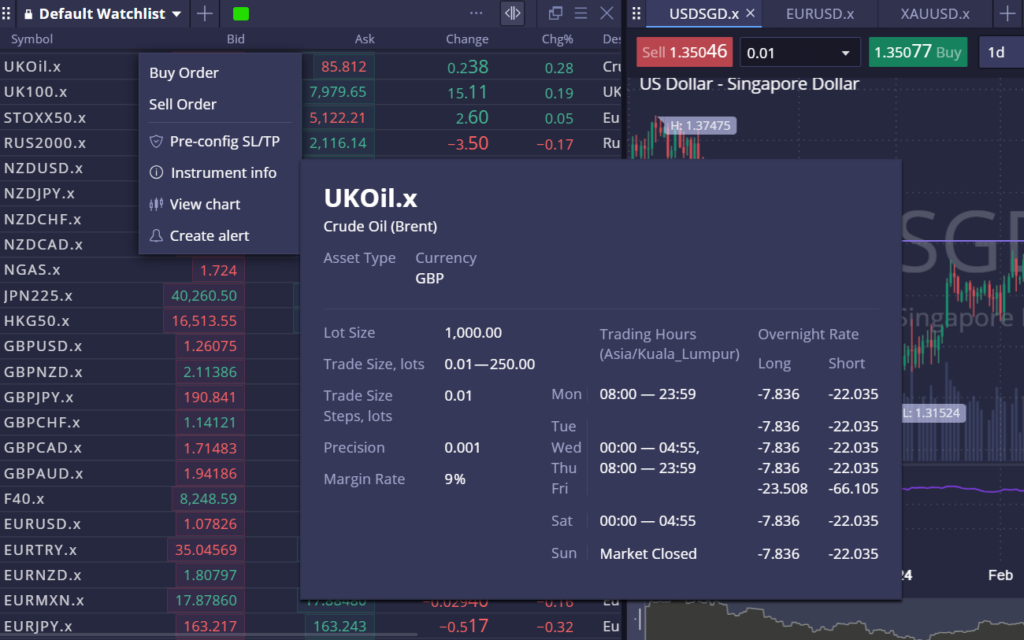
How to check instrument info in DXtrade?

To check the instrument information, right-click on a symbol from the watchlist and select [Instrument Info]. From here, you’ll be able to see a variety of data such as margin rate, trading hours, and minimum/maximum lot size.

Was this FAQ helpful?
YesNo

Do you still need help?

Everything you need to know about our platform, evaluations and how to set up your FXIFY™ account.