Page background
FLASH SALE: 40% OFF INSTANT FUNDING (excl. Instant Lite)
FUNDED40
NEW TRADERS: 35% OFF 1-PHASE
ONESTEP35

SAVE WITH OUR EXCLUSIVE PROMOS

FLASH SALE: 40% OFF INSTANT FUNDING (excl. Instant Lite)
Expires: 3rd November 2026
FUNDED40
NEW TRADERS: 35% OFF 1-PHASE
Expires: 31st December 2026
ONESTEP35
FLASH SALE: 40% OFF INSTANT FUNDING (excl. Instant Lite)
Expires: 3rd November 2026
FUNDED40
NEW TRADERS: 35% OFF 1-PHASE
Expires: 31st December 2026
ONESTEP35
FLASH SALE: 40% OFF INSTANT FUNDING (excl. Instant Lite)
Expires: 3rd November 2026
FUNDED40
NEW TRADERS: 35% OFF 1-PHASE
Expires: 31st December 2026
ONESTEP35
FLASH SALE: 40% OFF INSTANT FUNDING (excl. Instant Lite)
Expires: 3rd November 2026
FUNDED40
NEW TRADERS: 35% OFF 1-PHASE
Expires: 31st December 2026
ONESTEP35
FLASH SALE: 40% OFF INSTANT FUNDING (excl. Instant Lite)
Expires: 3rd November 2026
FUNDED40
NEW TRADERS: 35% OFF 1-PHASE
Expires: 31st December 2026
ONESTEP35
FLASH SALE: 40% OFF INSTANT FUNDING (excl. Instant Lite)
Expires: 3rd November 2026
FUNDED40
NEW TRADERS: 35% OFF 1-PHASE
Expires: 31st December 2026
ONESTEP35
FLASH SALE: 40% OFF INSTANT FUNDING (excl. Instant Lite)
Expires: 3rd November 2026
FUNDED40
NEW TRADERS: 35% OFF 1-PHASE
Expires: 31st December 2026
ONESTEP35
FLASH SALE: 40% OFF INSTANT FUNDING (excl. Instant Lite)
Expires: 3rd November 2026
FUNDED40
NEW TRADERS: 35% OFF 1-PHASE
Expires: 31st December 2026
ONESTEP35
FLASH SALE: 40% OFF INSTANT FUNDING (excl. Instant Lite)
Expires: 3rd November 2026
FUNDED40
NEW TRADERS: 35% OFF 1-PHASE
Expires: 31st December 2026
ONESTEP35
FLASH SALE: 40% OFF INSTANT FUNDING (excl. Instant Lite)
Expires: 3rd November 2026
FUNDED40
NEW TRADERS: 35% OFF 1-PHASE
Expires: 31st December 2026
ONESTEP35
FAQs / All FAQs

All FAQs

Everything you need to know about our platform, evaluations and how to set up your FXIFY™ account.

Do you still need help?

Everything you need to know about our platform, evaluations and how to set up your FXIFY™ account.
FAQs
/
All FAQs
/
How to journal my trades in DXtrade?

How to journal my trades in DXtrade?

 DXtrade offers a comprehensive journaling experience with its tag and note functionality. Each trade can be tagged and sorted by category, and a personal note can be inputted to add context to the trade.

Action Description
Adding a tag to your trade Click on the [Tags] button on a recorded trade,  and select the category you wish to classify a trade under. Multiple tags can be selected at once.
Adding a Trade Note Hover over the note section on a recorded trade, and click on [Trade Note] or [Position Note] to key in a personalised note about the trade.
Filtering Trades by Time Range, and Tags At the top of your Trading Journal, you’ll see a section for [Time Range] and [Tags]:

  • Set a date range with the [Time Range] button to see trades within a specific period. 
  • From the top bar, click a tag to view your trades by category. Multiple tags can be selected at once.
Arrange trades by Ascending or Descending Order At the top of your Trading Journal, you can click on [Symbol], [Date and Time], and a variety of other elements to arrange your trades by ascending or descending order.
Reset Filters There is an option to [Clear All Filters] at the top right of your Trading Journal.


Was this FAQ helpful?
YesNo

Do you still need help?

Everything you need to know about our platform, evaluations and how to set up your FXIFY™ account.
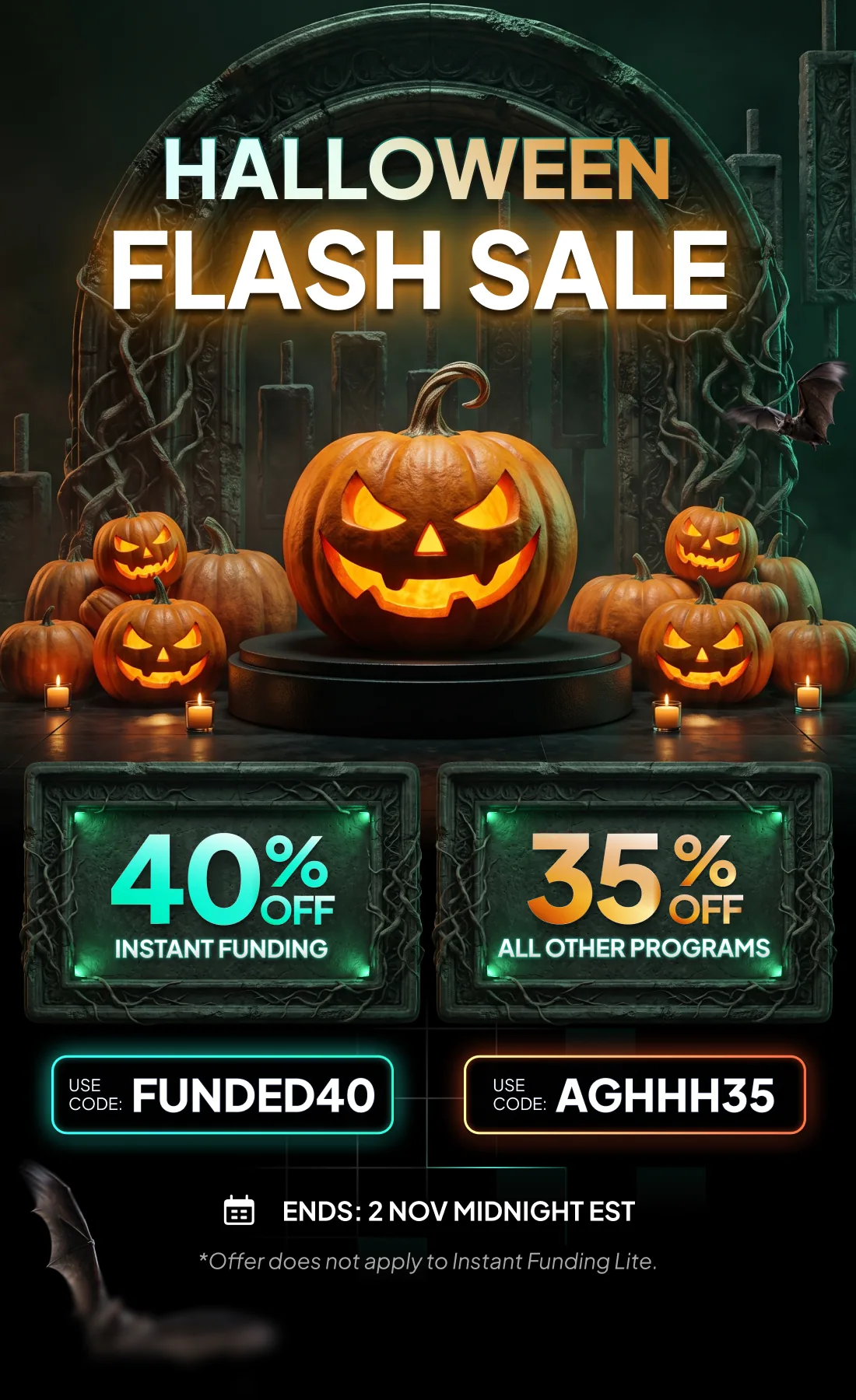
Halloween Flash Sale — 40% off Instant Funding with code FUNDED40, 35% off all other programs with code AGHHH35. Ends 2 Nov midnight EST. Offer does not apply to Instant Funding Lite.

JOIN US NOW!

GET EARLY ACCESS TO UPCOMING OFFERS

*By submitting this form, you agree to receive marketing emails from FXIFY.
FXIFY Pulse | Market Insights — live on YouTube every Tuesday & Thursday, 10AM EST / GMT-4 Hosted by Jeremy Wagner, CEWA-M — Head of Research at Alchemy Markets, former Head of Technical Analysis at DailyFX NOTIFY ME