Page background
NEW TRADERS: 30% OFF 1-PHASE
ONESTEP30
THIS MONTH'S OFFER: 20% OFF ALL PROGRAMS (excl. Instant Lite)
CHART20

SAVE WITH OUR EXCLUSIVE PROMOS

NEW TRADERS: 30% OFF 1-PHASE
Expires: 31st December 2026
ONESTEP30
THIS MONTH'S OFFER: 20% OFF ALL PROGRAMS (excl. Instant Lite)
Expires: 1st October 2026
CHART20
NEW TRADERS: 30% OFF 1-PHASE
Expires: 31st December 2026
ONESTEP30
THIS MONTH'S OFFER: 20% OFF ALL PROGRAMS (excl. Instant Lite)
Expires: 1st October 2026
CHART20
NEW TRADERS: 30% OFF 1-PHASE
Expires: 31st December 2026
ONESTEP30
THIS MONTH'S OFFER: 20% OFF ALL PROGRAMS (excl. Instant Lite)
Expires: 1st October 2026
CHART20
NEW TRADERS: 30% OFF 1-PHASE
Expires: 31st December 2026
ONESTEP30
THIS MONTH'S OFFER: 20% OFF ALL PROGRAMS (excl. Instant Lite)
Expires: 1st October 2026
CHART20
NEW TRADERS: 30% OFF 1-PHASE
Expires: 31st December 2026
ONESTEP30
THIS MONTH'S OFFER: 20% OFF ALL PROGRAMS (excl. Instant Lite)
Expires: 1st October 2026
CHART20
NEW TRADERS: 30% OFF 1-PHASE
Expires: 31st December 2026
ONESTEP30
THIS MONTH'S OFFER: 20% OFF ALL PROGRAMS (excl. Instant Lite)
Expires: 1st October 2026
CHART20
NEW TRADERS: 30% OFF 1-PHASE
Expires: 31st December 2026
ONESTEP30
THIS MONTH'S OFFER: 20% OFF ALL PROGRAMS (excl. Instant Lite)
Expires: 1st October 2026
CHART20
NEW TRADERS: 30% OFF 1-PHASE
Expires: 31st December 2026
ONESTEP30
THIS MONTH'S OFFER: 20% OFF ALL PROGRAMS (excl. Instant Lite)
Expires: 1st October 2026
CHART20
NEW TRADERS: 30% OFF 1-PHASE
Expires: 31st December 2026
ONESTEP30
THIS MONTH'S OFFER: 20% OFF ALL PROGRAMS (excl. Instant Lite)
Expires: 1st October 2026
CHART20
NEW TRADERS: 30% OFF 1-PHASE
Expires: 31st December 2026
ONESTEP30
THIS MONTH'S OFFER: 20% OFF ALL PROGRAMS (excl. Instant Lite)
Expires: 1st October 2026
CHART20
FAQs / All FAQs

All FAQs

Everything you need to know about our platform, evaluations and how to set up your FXIFYâ„¢ account.

Do you still need help?

Everything you need to know about our platform, evaluations and how to set up your FXIFYâ„¢ account.
FAQs
/
All FAQs
/
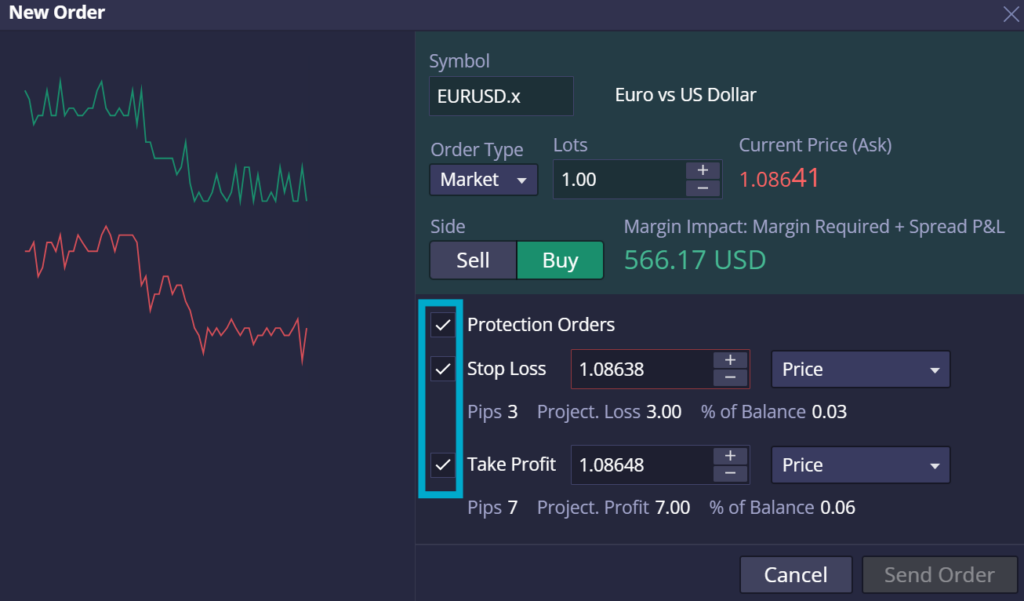
How to set Stop Loss and Take Profit in DXtrade?
How to set Stop Loss and Take Profit in DXtrade?

When entering a trade, a [New Order] window appears, allowing you to configure the Order Type (Limit, Market, Stop), Lots, Side, and enable [Protection Orders] to set a stop loss and take profit.

One-Click Trading / Instant Market Entries:

 [One-Click Trading] is a special toggle that allows you to instantly enter trades at market price, allowing you to quickly capture trade opportunities arising in the market. 

  1. Toggle the One-click trading function, found next to ‘Tools’ at the top bar.
  2. Click buy or sell to directly enter a trade at market price.


When paired with DXtrade’s [Pre-Config SL/TP] feature, [One-Click Trading] becomes a powerful tool for executing scalp or day trades with automatically placed stop losses and take profits, based on your strategy settings.


Was this FAQ helpful?
YesNo
Do you still need help?

Everything you need to know about our platform, evaluations and how to set up your FXIFYâ„¢ account.
Back to Trading — summer sun is down, charts are back up. 20% off all programs. Use code CHART20.

JOIN US NOW!

GET EARLY ACCESS TO UPCOMING OFFERS

ENDS 1 OCT MIDNIGHT EST *Offer Excludes Instant Funding Lite
FXIFY Pulse | Market Insights — live on YouTube every Tuesday & Thursday, 10AM EST / GMT-4 Hosted by Jeremy Wagner, CEWA-M — Head of Research at Alchemy Markets, former Head of Technical Analysis at DailyFX NOTIFY ME