Page background
NEW CUSTOMERS: 30% OFF 2 PHASE PRO
NEW30
Summer Flash Sale: 30% OFF + 90% SPLIT
FLASH30

SAVE WITH OUR EXCLUSIVE PROMOS

NEW CUSTOMERS: 30% OFF 2 PHASE PRO
Expires: 31st December 2026
NEW30
Summer Flash Sale: 30% OFF + 90% SPLIT
Expires: 5th July 2026
FLASH30
NEW CUSTOMERS: 30% OFF 2 PHASE PRO
Expires: 31st December 2026
NEW30
Summer Flash Sale: 30% OFF + 90% SPLIT
Expires: 5th July 2026
FLASH30
NEW CUSTOMERS: 30% OFF 2 PHASE PRO
Expires: 31st December 2026
NEW30
Summer Flash Sale: 30% OFF + 90% SPLIT
Expires: 5th July 2026
FLASH30
NEW CUSTOMERS: 30% OFF 2 PHASE PRO
Expires: 31st December 2026
NEW30
Summer Flash Sale: 30% OFF + 90% SPLIT
Expires: 5th July 2026
FLASH30
NEW CUSTOMERS: 30% OFF 2 PHASE PRO
Expires: 31st December 2026
NEW30
Summer Flash Sale: 30% OFF + 90% SPLIT
Expires: 5th July 2026
FLASH30
NEW CUSTOMERS: 30% OFF 2 PHASE PRO
Expires: 31st December 2026
NEW30
Summer Flash Sale: 30% OFF + 90% SPLIT
Expires: 5th July 2026
FLASH30
NEW CUSTOMERS: 30% OFF 2 PHASE PRO
Expires: 31st December 2026
NEW30
Summer Flash Sale: 30% OFF + 90% SPLIT
Expires: 5th July 2026
FLASH30
NEW CUSTOMERS: 30% OFF 2 PHASE PRO
Expires: 31st December 2026
NEW30
Summer Flash Sale: 30% OFF + 90% SPLIT
Expires: 5th July 2026
FLASH30
NEW CUSTOMERS: 30% OFF 2 PHASE PRO
Expires: 31st December 2026
NEW30
Summer Flash Sale: 30% OFF + 90% SPLIT
Expires: 5th July 2026
FLASH30
NEW CUSTOMERS: 30% OFF 2 PHASE PRO
Expires: 31st December 2026
NEW30
Summer Flash Sale: 30% OFF + 90% SPLIT
Expires: 5th July 2026
FLASH30
FAQs / All FAQs

All FAQs

Everything you need to know about our platform, evaluations and how to set up your FXIFYâ„¢ account.

Do you still need help?

Everything you need to know about our platform, evaluations and how to set up your FXIFYâ„¢ account.
FAQs
/
All FAQs
/
What Is The TradingView Screener Feature?

What Is The TradingView Screener Feature?

The Screener in TradingView is a powerful tool to filter assets (stocks, forex, crypto) based on a variety of metrics such as performance, technical indicators, and financial ratios.

How to use it:

  1.   Click the Screener tab at the bottom of the TradingView interface.
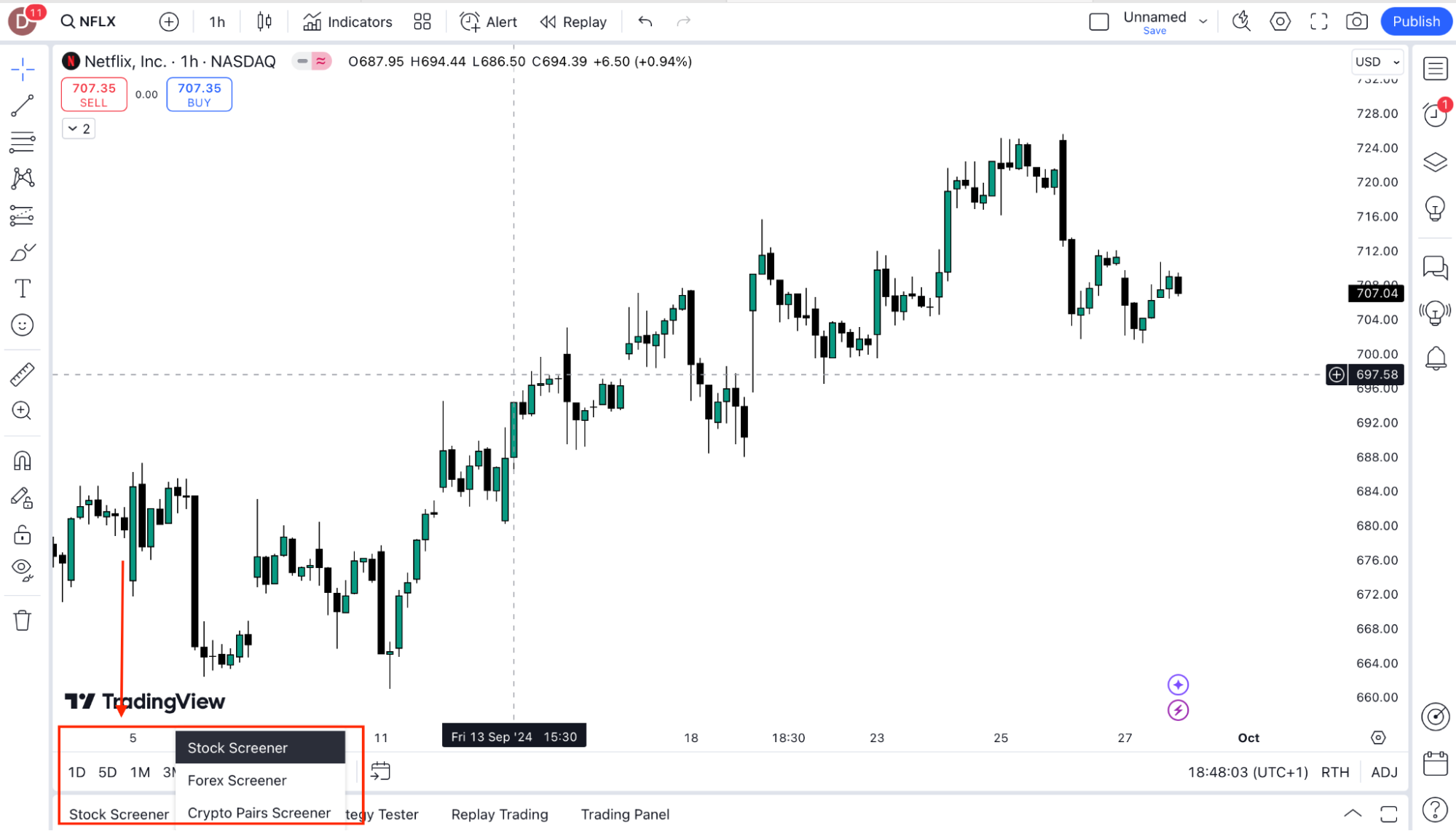
  2.   Choose from Stock Screener, Forex Screener, or Crypto Screener depending on the market you’re analyzing.

  3.   Set filters like price change, volume, and various technical indicators.
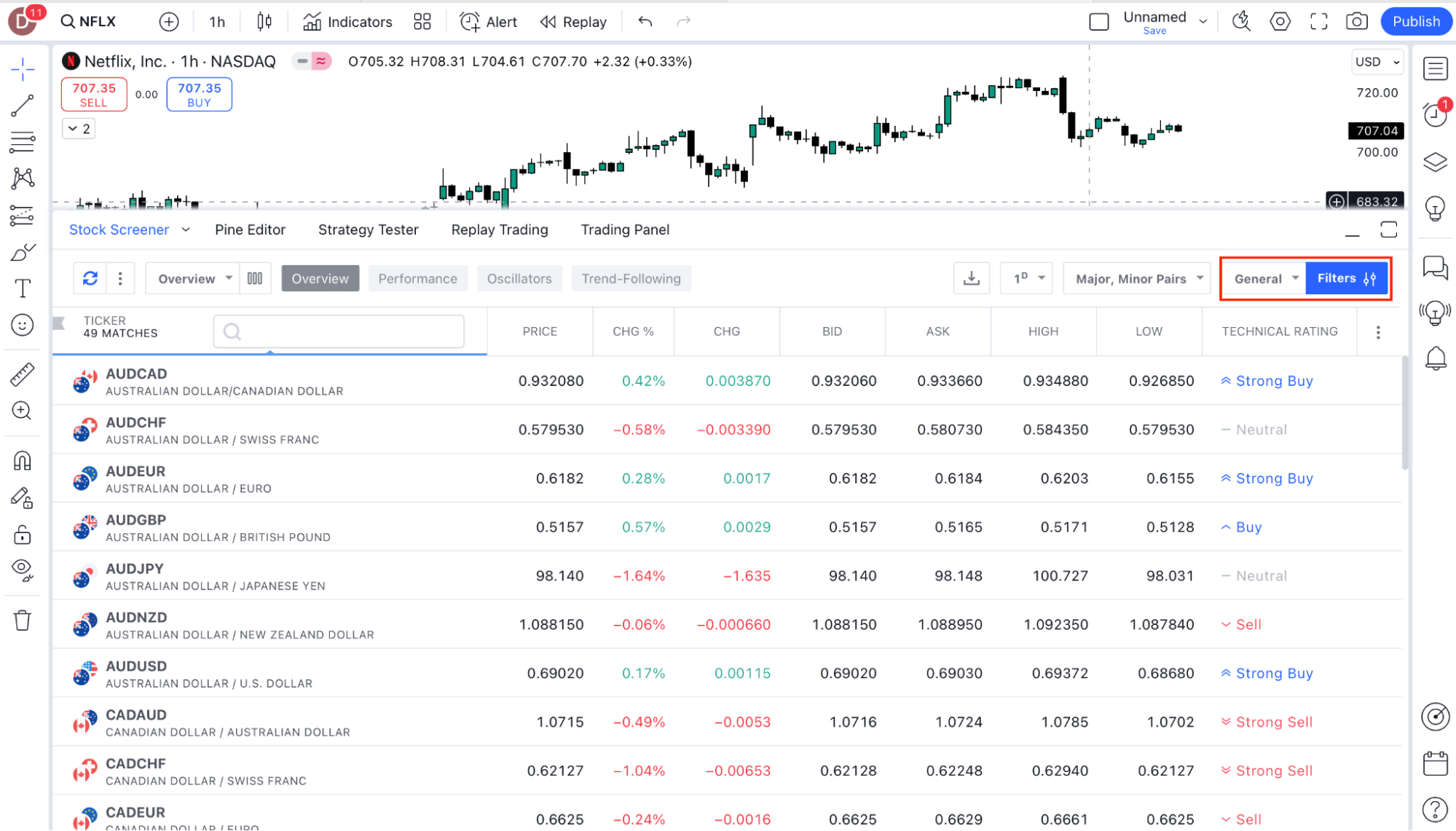
  4.   You can also sort by different criteria to find the best trading opportunities based on your strategy.

The Screener helps you quickly narrow down a large list of assets to those that fit your trading plan.


Was this FAQ helpful?
YesNo

Do you still need help?

Everything you need to know about our platform, evaluations and how to set up your FXIFYâ„¢ account.
Summer Flash Sale — 30% off all programs + 1 free add-on. Use code FLASH30. 4 days only.

JOIN US NOW!

GET EARLY ACCESS TO UPCOMING OFFERS

LIMITED-TIME OFFER *Offer Excludes Instant Funding Lite