Page background
3rd Anniversary Sale - 33% OFF (excl. Instant Funding Lite)
FXIFY3

SAVE WITH OUR EXCLUSIVE PROMOS

3rd Anniversary Sale - 33% OFF (excl. Instant Funding Lite)
Expires: 31st May 2026
FXIFY3
3rd Anniversary Sale - 33% OFF (excl. Instant Funding Lite)
Expires: 31st May 2026
FXIFY3
3rd Anniversary Sale - 33% OFF (excl. Instant Funding Lite)
Expires: 31st May 2026
FXIFY3
3rd Anniversary Sale - 33% OFF (excl. Instant Funding Lite)
Expires: 31st May 2026
FXIFY3
3rd Anniversary Sale - 33% OFF (excl. Instant Funding Lite)
Expires: 31st May 2026
FXIFY3
3rd Anniversary Sale - 33% OFF (excl. Instant Funding Lite)
Expires: 31st May 2026
FXIFY3
3rd Anniversary Sale - 33% OFF (excl. Instant Funding Lite)
Expires: 31st May 2026
FXIFY3
3rd Anniversary Sale - 33% OFF (excl. Instant Funding Lite)
Expires: 31st May 2026
FXIFY3
3rd Anniversary Sale - 33% OFF (excl. Instant Funding Lite)
Expires: 31st May 2026
FXIFY3
3rd Anniversary Sale - 33% OFF (excl. Instant Funding Lite)
Expires: 31st May 2026
FXIFY3
FAQs / All FAQs

All FAQs

Everything you need to know about our platform, evaluations and how to set up your FXIFY™ account.

Do you still need help?

Everything you need to know about our platform, evaluations and how to set up your FXIFY™ account.
FAQs
/
All FAQs
/
Where do I set Alerts in DXtrade?
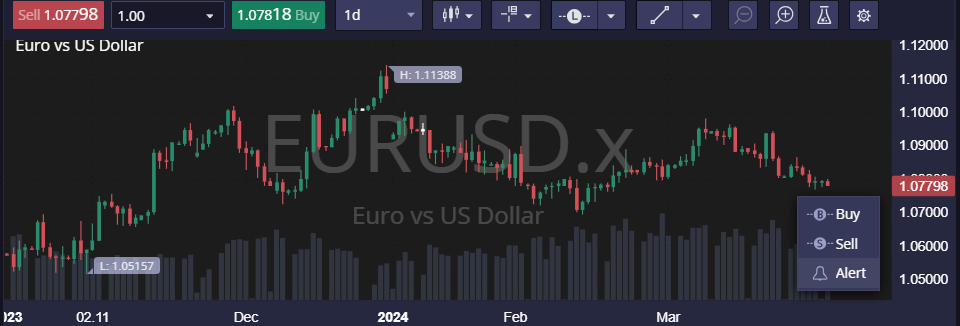
Where do I set Alerts in DXtrade?

Alerts can be set simply by right-clicking the chart, and then selecting ‘Alert’. This creates an alert at the exact price point you’ve clicked.
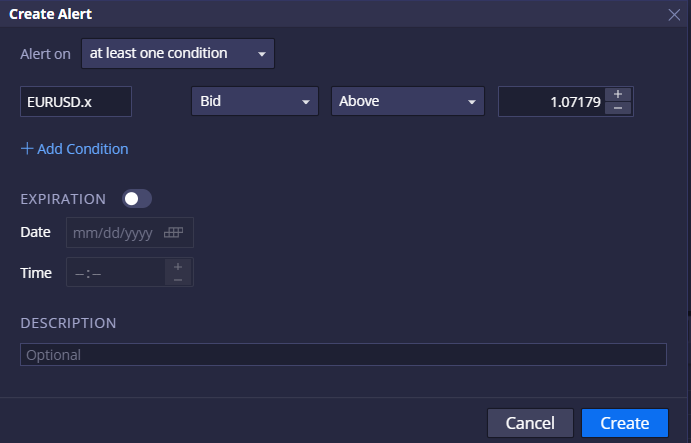
There are many conditions traders can apply to the alert, allowing for a comprehensive alert system that signals you only when preferable entry or exit conditions are met.


Was this FAQ helpful?
YesNo
Do you still need help?

Everything you need to know about our platform, evaluations and how to set up your FXIFY™ account.
FXIFY Anniversary
Buy any account before May 31 to enter and win a free challenge account up to $250K.
FXIFY Anniversary