





How to Code an Expert Advisor: MQL Basics
You open MetaEditor for the first time and stare at a blank screen where a chart should be. No candles, just curly brackets and a…
You open MetaEditor for the first time and stare at a blank screen where a chart should be. No candles, just curly brackets and a blinking cursor. That is the normal starting point for learning how to code an Expert Advisor. An EA trades for you once the rules are written into it, reading live price data and opening or closing trades on its own.
Functions like OnTick() do not match the charts and order tickets you already know, and that gap is exactly what this guide closes. You will see how a simple rule, like a fast average crossing above a slow average, becomes working code. You will see a full pseudocode example and the mistakes that trip up most beginners. You will also get the exact rule to check before you run an EA on a funded account.
Key Terms
| Term | What It Means |
| EA (Expert Advisor) | A program that trades for you based on rules |
| MQL | The programming language used to write EAs on MetaTrader |
| MQL4 / MQL5 | The two versions of MQL. MQL4 runs on MetaTrader 4. MQL5 runs on MetaTrader 5 |
| OnTick() | The part of the code that runs every time the price updates |
| Indicator | A calculation, such as a moving average, that the EA reads to make a decision |
| Lot size | The size of a trade, set inside the order function |
| Stop loss | The price level that closes a losing trade automatically |
| Take profit | The price level that closes a winning trade automatically |
| Backtesting | Testing an EA against historical price data |
| Forward testing | Testing an EA on a demo account, in real time, with no real money at risk |
| Slippage | The difference between the price you expected and the price you got |
| Spread | The gap between the bid price and the ask price |
Keep this table open while you read the rest of the guide. Every term above comes up again below.
What You Need Before You Start
- MetaTrader 4 or MetaTrader 5, matched to the version your account actually runs.
- MetaEditor, which comes bundled with MetaTrader, to write and test your code.
- A demo account, so you never test on money you cannot afford to lose.
- Basic comfort with your platform, including how to attach an EA to a chart.
If you are not sure which platform version your account uses, check the FXIFY platforms FAQ before you start writing anything.
What Is MQL?
MQL is the programming language used on MetaTrader. Both versions let you write an EA, a custom indicator, or a script.
An EA is not magic. It is a set of written rules. If the price does A, the code tells the platform to do B. Nothing runs unless you write the instruction for it yourself.
You do not need years of coding experience to read basic MQL. Most EA code follows the same small set of building blocks. Once you understand those blocks, you can read and adjust an EA even if you did not write it.
The Building Blocks of an Expert Advisor
Every EA is built from a few core parts. Learn these first, before you try to write a full program.
The OnTick Function
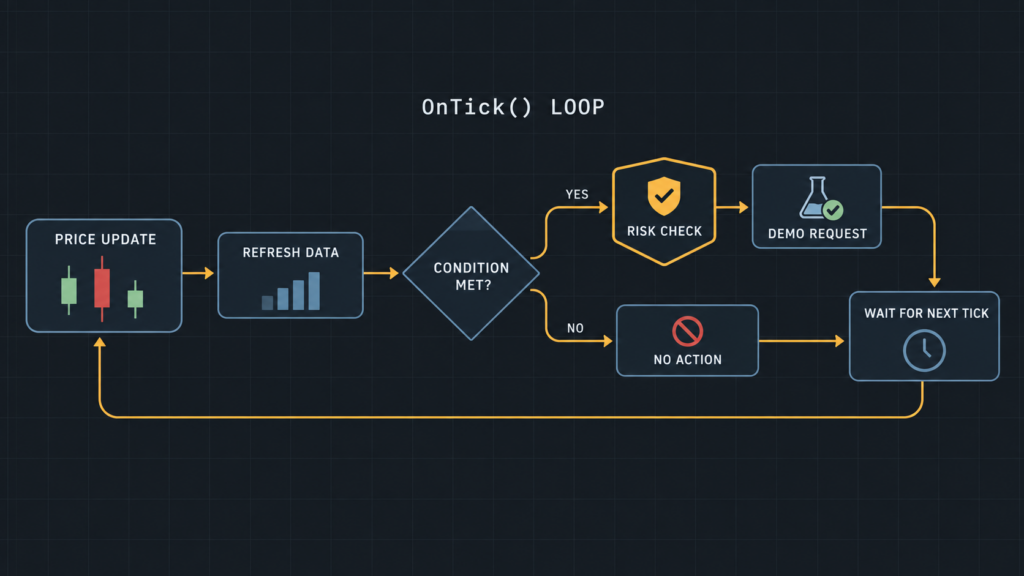
OnTick() is the part of the code that runs every time the price updates. This is where most of the EA logic sits. If you want the EA to check a condition on every price movement, you place that check inside OnTick().
Think of it as a loop that never stops while the EA is active. Each new tick, the code runs from the top of OnTick() again.
Indicators as Inputs
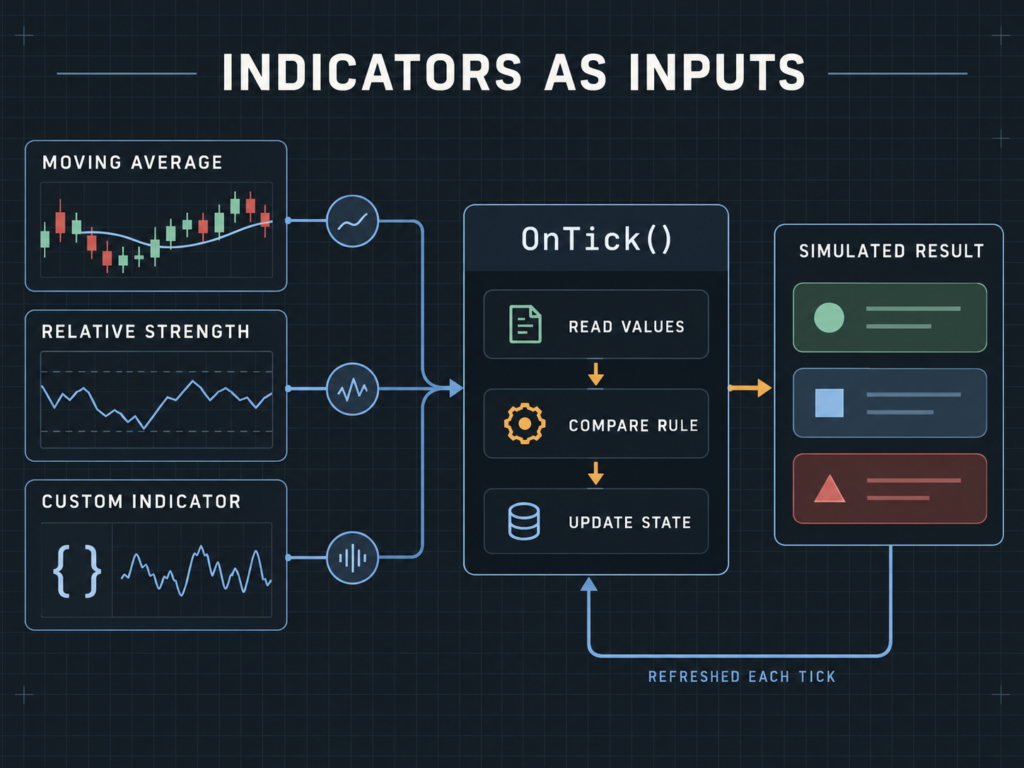
An EA usually needs an indicator to make a decision. A moving average, a relative strength index, or a custom indicator can all feed into the code as an input value.
The EA reads the indicator value on each tick. It then compares that value against a rule you set, such as a fast average moving above a slow average.
Order Functions
Order functions are the commands that open, close, or modify a trade. In MQL, these functions handle the entry price, the lot size, the stop loss, and the take profit.
This is the part of the code with the most risk. A mistake here can send the wrong lot size or skip a stop loss entirely. Test every order function on a demo account before you use it live. Skip this step and you are betting on code you have not checked.
How to Code a Simple Expert Advisor: A Basic Example
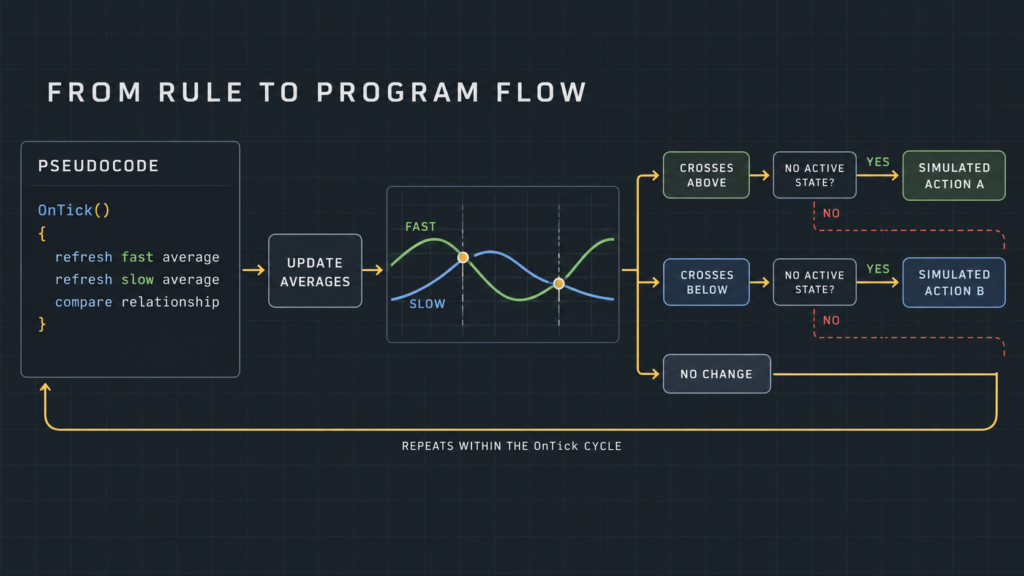
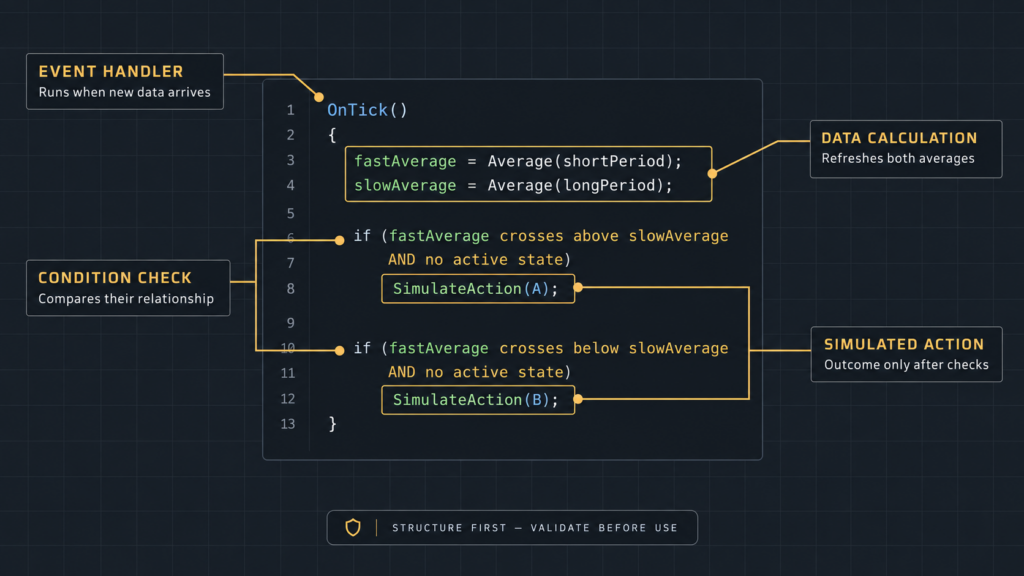
Here is the logic for a basic moving-average-crossover EA, written as pseudocode rather than full working code. This shows the thinking behind the program, not a copy of any existing script.
// Simplified EA logic, pseudocode only
OnTick()
{
fastMA = MovingAverage(10);
slowMA = MovingAverage(50);
if (fastMA crosses above slowMA AND no open trade)
OpenBuy(lotSize = 0.01, stopLoss, takeProfit);
if (fastMA crosses below slowMA AND no open trade)
OpenSell(lotSize = 0.01, stopLoss, takeProfit);
}
The 10 and 50 are example periods, not a recommendation. The 0.01 lot size is an example too. Your real values depend on your account size and your own risk rule.
This is a starting structure, not a finished trading strategy. A real EA needs testing, refinement, and honest risk limits before it goes anywhere near a live account. Every trader who has coded a first EA hits this same point. The code runs. That does not mean it is ready.
Common Mistakes Beginners Make
New EA coders tend to repeat the same errors. Watch for these.
- Over-optimizing on old data. It is easy to adjust the code until it performs perfectly on the past. That result rarely repeats going forward. A strategy tuned too closely to old data usually breaks on new data.
- Ignoring spread and slippage. A backtest that assumes a perfect fill price will show better results than real trading. Spread and slippage change the outcome of every order, and the code should account for both.
- Skipping proper testing. Some beginners write an EA and run it live within a day. Run a new EA on a demo account across different market conditions first. Skip that step and you are trading a program you have not checked.
- Writing an EA with no stop condition. An EA with no limit on new trades and no check on total risk can do serious damage. One bad trading day is enough. Ask any trader who has watched this happen. The story is rarely a good one.
Backtesting and Forward Testing
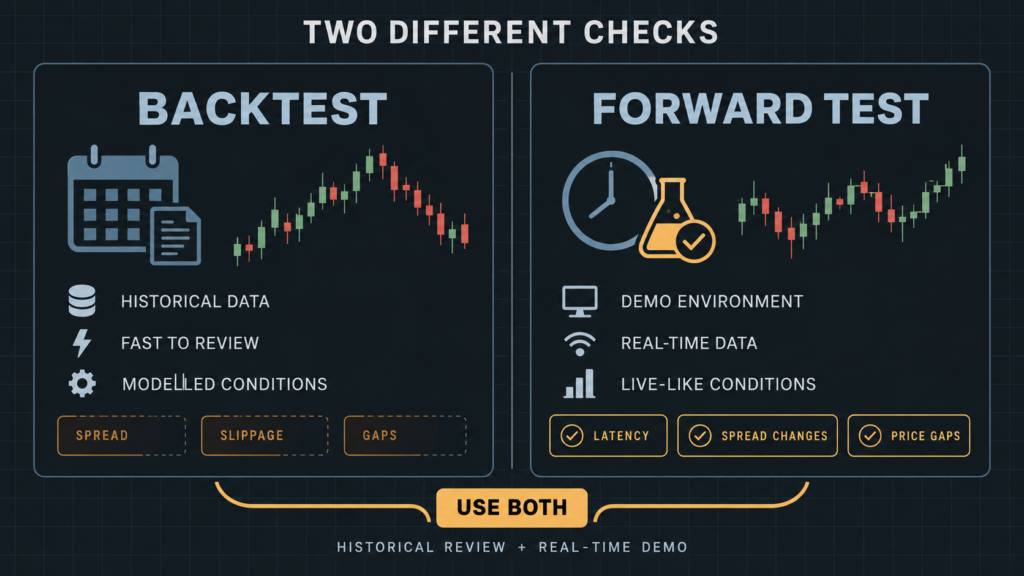
Backtesting runs your EA against historical price data to see how it would have performed. It is a first check, not a final answer. Historical data does not capture live spread, slippage, or sudden price gaps in full.
Forward testing runs the EA on a demo account in real time, with live prices but no real money at risk. This step catches problems that backtesting often misses, such as how the code handles a slow internet connection or a sudden price gap.
Run both before you consider using an EA with real capital. Skipping either step means you are trading a program you have not properly checked.
Building Risk Controls Into Your Code
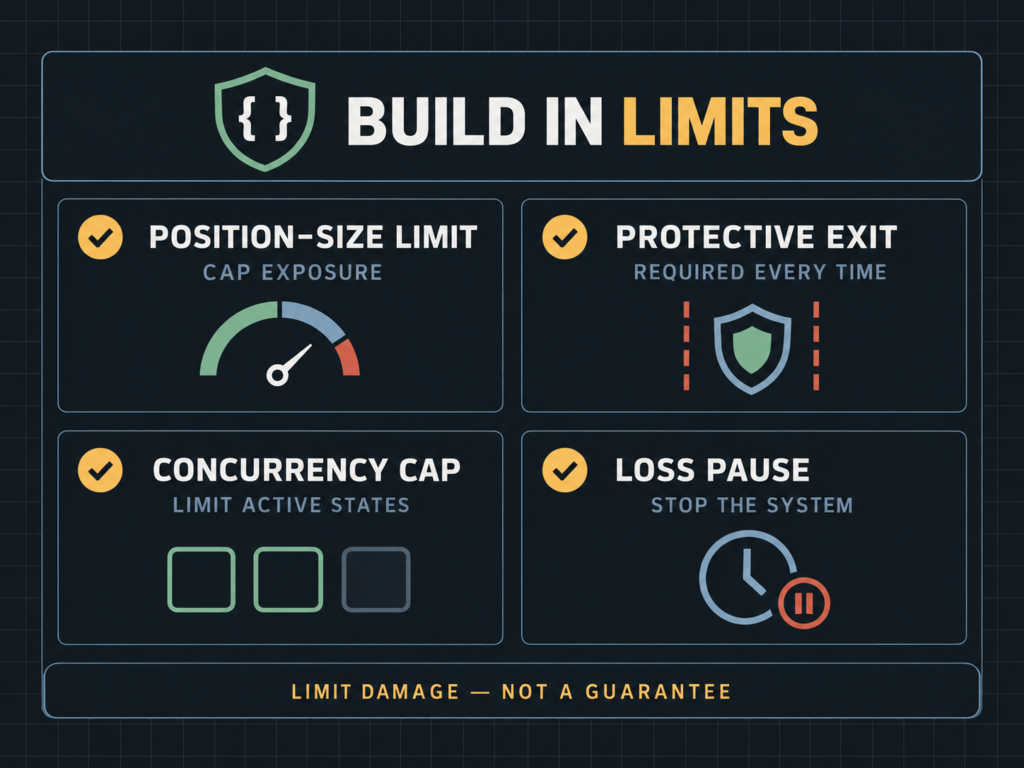
Good EA code includes limits, not just entry signals. A few basics to build in from the start:
- A fixed or calculated lot size, so one trade cannot risk more than you plan for.
- A stop loss on every single order, with no exceptions written into the code.
- A maximum number of open trades at one time.
- A daily or weekly stop that pauses the EA after a set number of losing trades.
These controls do not guarantee a profit. They limit how much damage a bad run of trades can do while you learn.
Using an EA on a Funded Account
If you plan to run an EA on a FXIFY funded account, check the rule first. FXIFY allows the use of an Expert Advisor on the One Phase, Two Phase, and Three Phase programs. This includes the funded account that follows each one. Approval from the FXIFY support team is required before you use it. Using an EA without that approval can result in a breach of the Terms of Service and suspension of the account, without eligibility for profits.
Contact FXIFY support before you run any EA on a live or funded account. This step applies before you start trading with it, not after. Full details are available on the official FAQ page.
Quick Checklist Before You Run Your First EA
Code is complete and matches your rules exactly, not roughly.
Backtested against historical data across more than one market condition.
Forward-tested on a demo account in real time.
Stop loss, take profit, and lot size are all set inside the code.
Maximum open trades and a daily loss stop are built in.
Approval is requested from FXIFY support if this is a funded account.
Frequently Asked Questions
Do I need to know how to code before I use an Expert Advisor?
No. You can run an EA someone else built without writing any code yourself. Understanding the logic still helps, since it lets you judge whether the EA fits your own risk rule.
Can I use an EA that someone else built, not one I coded myself?
Yes, in general. If you plan to use it on an FXIFY funded account, the same approval rule applies, no matter who wrote the code. Contact support before you run it.
Is MQL hard to learn?
It depends on your background. If you have never coded before, expect a learning curve. Start with the basic blocks in this guide: OnTick(), indicators, and order functions, before you attempt a full strategy.
Does MetaTrader 4 or MetaTrader 5 matter for EA coding?
Yes. MQL4 and MQL5 are different versions of the language, and code written for one does not run on the other without changes. Check which platform your account uses before you start writing.
Does FXIFY allow Expert Advisors on every program?
FXIFY allows EA use on the One Phase, Two Phase, and Three Phase programs and their funded accounts, after review and approval from support. Confirm the current rule on the official FAQ page before you use one.